StaticContent
Overview
1. AccPack_StaticContent
The AccPack_StaticContent loads text stored inside a staticContent.xml configuration file. Use this when a piece of content is fixed across all data records but needs to vary by language, country, assortment, or well — without storing it as a data record in the database.
2. Architectural Decision: Static Content vs. Data Records
Choosing the correct placeholder depends on whether the text is dynamic product data or fixed publication labels.
| Placeholder | Data Source | Ideal Use Case |
|---|---|---|
| AccPack_Text | Database Records | Long-form marketing copy, product descriptions, or unique disclaimers stored in the PIM. |
| AccPack_DocumentParameter | Planner UI | Values set per document, such as "Catalog Year" or "Issue Number". |
| AccPack_StaticContent | staticContent.xml | Fixed labels or boilerplate text that is identical for all products but requires translation. |
When to choose AccPack_StaticContent:
A consultant should choose this placeholder when a piece of content is fixed across all data records but needs to vary by locale—such as language, country, assortment, or well—without storing it as a formal data record in the database.
Typical Use Case:
Common examples include legal boilerplate text or section headers (e.g., "Technical Data," "Safety Warnings") that remain the same for all products on a page but must differ by locale [User Query]. This approach avoids the overhead of creating thousands of identical attribute records in the PIM for static labels.
Global Configuration Logic
1. Context Definition
Unlike most placeholders that only use language and country, AccPack_StaticContent supports an extended range of context criteria.
-
Supported Contexts:
_language,_country,_assortment, and_well. -
The system evaluates these criteria against the entries in the XML configuration file to return the most specific match for the current publication's settings.
2. Configuration Requirements
The staticContent.xml file must utilize the xmlns:con namespace to be compatible with the Publishing Server’s configuration manager.
Technical Specification
Placeholder type: Text
Entity: Static XML Configuration
Function Variables
- Identifier: The unique identifier of the static content entry as defined in the
staticContent.xmlfile.
Developer Specifications
-
Data Query:
com.priint.accpack.placeholder.dataquery.StaticContentPlugin.getStaticContentByIdentifier. -
Data Mapping:
com.priint.pubserver.plugins.datamapping.DataMappingPassThrough.passThrough. -
Data Processing:
-
htmlToPlainText: Removes all HTML tags. -
htmlToTaggedText: Converts HTML tags intopriint:comettagged text for InDesign to maintain layout styles.
-
Technical Environment & Deployment
Consultants could find guide for deployment of generic placeholders here: installation & configuration
Configuration Pathing: The staticContent.xml file must be placed in the following directory: com.priint.accpack.placeholder.GenericPlaceholderPlugin/<client_name>/default (where <client_name> defaults to WerkII).
Demonstration & Implementation Examples
The following examples illustrate the relationship between the XML configuration and the InDesign output.
Example: XML Structure for a "Content" Header
<?xml version="1.0" encoding="UTF-8"?><con:PluginConfig xmlns:con="com.priint.pubserver.config.manager/20130620">
    <con:name>staticContent.xml</con:name>
    <con:type>translations</con:type>
    <con:custom>
        <translations>
            <translation identifier="bb_artnumber">
                <entry assortment="" country="" lang="" well="">ART.-NO.</entry>
                <entry assortment="" country="" lang="eng" well="">ART.-NO.</entry>
                <entry assortment="" country="GB" lang="eng" well="">ART.-NO.</entry>
                <entry assortment="" country="" lang="deu" well="">ART.-NR.</entry>
                <entry assortment="" country="DE" lang="deu" well="">ART.-NR.</entry>
            </translation>
        </translations>
    </con:custom>
    <con:dependencies/>
    <con:instances/>
</con:PluginConfig>
Example Implementation
-
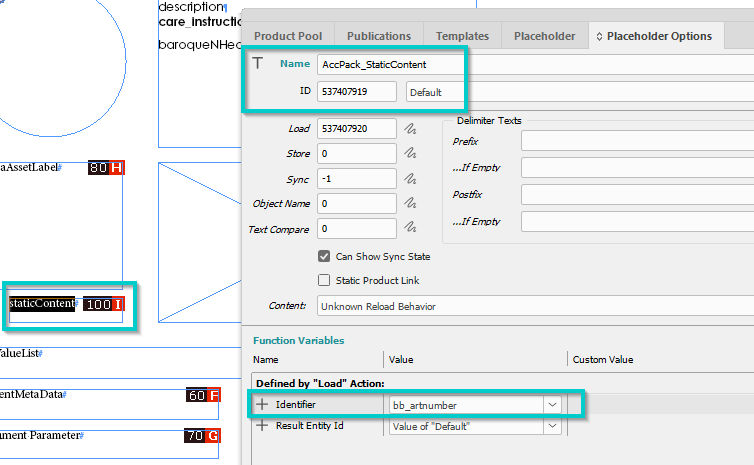
Identifier:
bb_artnumber -
Result (no language context): "ART.-NO"
-
Result (English): "ART.-NO"
-
Result (German): "ART.-NR"
Figure 1: Placeholder options configuration:
Firuge 2: Result (no context)
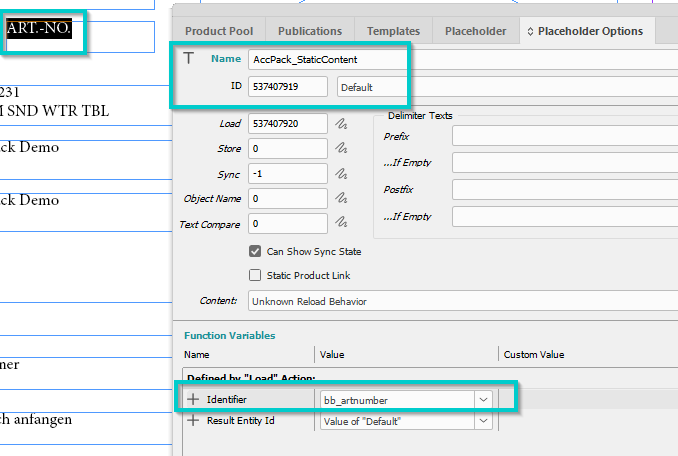
[Screenshot Placeholder: InDesign layout showing the translated header rendered based on the document's language context]
Further Reading
- Text — for text stored as data records rather than in a config file