ContentMetaData
Overview
1. AccPack_ContentMetaData
The AccPack_ContentMetaData is a generic text placeholder that evaluates the metadata of a planning record, bucket, or other entity types. Fallback behavior for planning entities: if the ContentMetaData cannot be found in the planning ContentMetaData, the implementation looks for the ContentMetaData at the planned bucket.
2. Strategic Use: Metadata vs. Key Values vs. Document Parameters
Choosing the correct placeholder depends on how and where the information is stored in the system.
| Data Type | Placeholder | Typical Information Stored |
|---|---|---|
| Attributes | AccPack_AttributeKeyValue | Standard product data (e.g., Color, Weight) stored as standalone records linked to a bucket. |
| Global Parameters | AccPack_DocumentParameter | Publication-wide values (e.g., Chapter Names, Season Codes) set at the document or publication level. |
| Entity Metadata | AccPack_ContentMetaData | Record-specific operational or technical data (e.g., layout behavior, creation states, or instance-specific copy). |
Why use ContentMetaData?
Consultants should use this placeholder when the required information is assigned as metadata directly to an entity object (such as a planning record or a bucket) rather than being a formal attribute. Typical examples include technical flags like move_resize or content_creation, and instance-specific text like Headline or Body assigned to a planning record in the Flatplan.
A critical feature is its fallback behavior: for planning entities, if the metadata is not found on the planning record itself, the implementation automatically looks for it on the planned bucket, ensuring data persistence throughout the planning workflow.
Technical Specification
Placeholder type: Text
Entity: Supports any entity object, including planning records, buckets, cords, key values, prices, and media assets.
Function Variables
-
Designator: Determines which field to return: Key or Value. The behavior of the placeholder is controlled through the following variables:
-
ContentMetaData Entity: Defines the entity type of the metadata to be retrieved.
-
ContentMetaData Key: The unique key for the specific metadata record (e.g.,
Headline). -
Result Entity ID: Identifier of the key-value result entity.
Developer Specifications
-
Data Query:
com.priint.accpack.placeholder.dataquery.ContentMetaDataQueryPlugin.getListContentMetaDataOfEntity. -
Data Mapping:
com.priint.accpack.placeholder.datamapping.GenericDataMapping.contentMetaDatasToStrings. -
Data Processing:
-
htmlToPlainText: Strips all HTML tags (Current standard behavior). -
htmlToTaggedText: Converts HTML tags intopriint:comettagged text for layout styles in InDesign.
-
Global Configuration Logic
1. Context Definition
Unlike most generic placeholders, AccPack_ContentMetaData does not support context (_language/_country). Metadata is treated as technical property data inherent to the object instance regardless of the publication's localized settings.
2. Planning Fallback Logic
The implementation follows a strict hierarchy for planning entities:
-
Search for the requested metadata key in the Planning Record.
-
If not found, search the Planned Bucket linked to that record.
Technical Environment & Deployment
Consultants could find guide for deployment of generic placeholders here: installation & configuration
Demonstration & Implementation Examples
Demo data for example:
Figure 1: Prepared data to be displayed in priint:admin
- Product: White heart
- Content metadata:
- Key: Headline
- Value: AccPack Demo
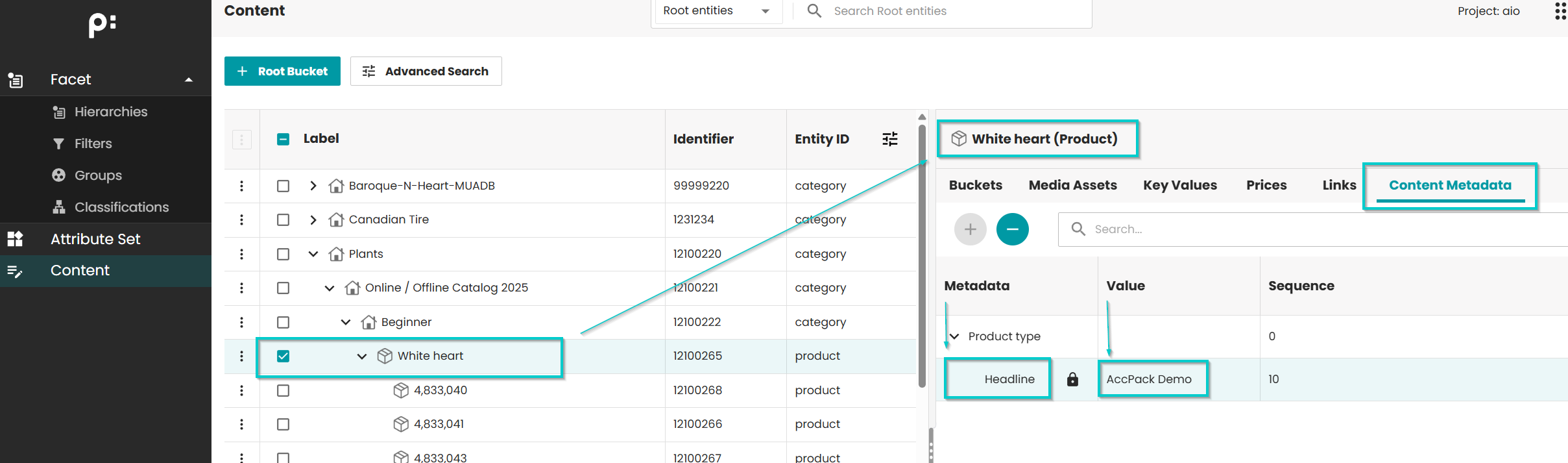
Figure 2: Placeholder Options for Child bucket template
- Template ID: 410523033
- Placeholder: AccPack_ContentMetaData
- Function variables:
- Designator: Value (value of the content metadata is displayed)
- ContentMetaData Key: Custom, value: Headline (the content metadata with
key=Headlineis displayed) - Other variables are set as default
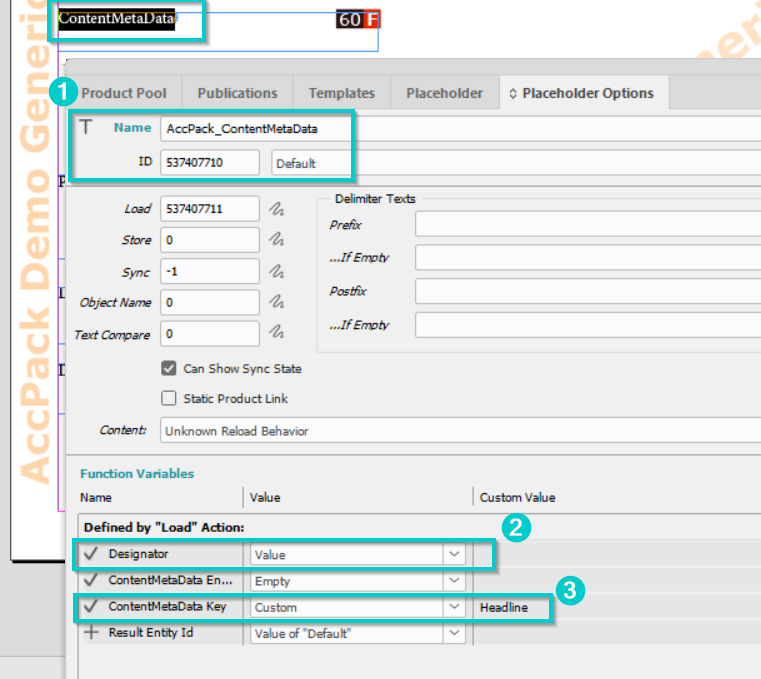
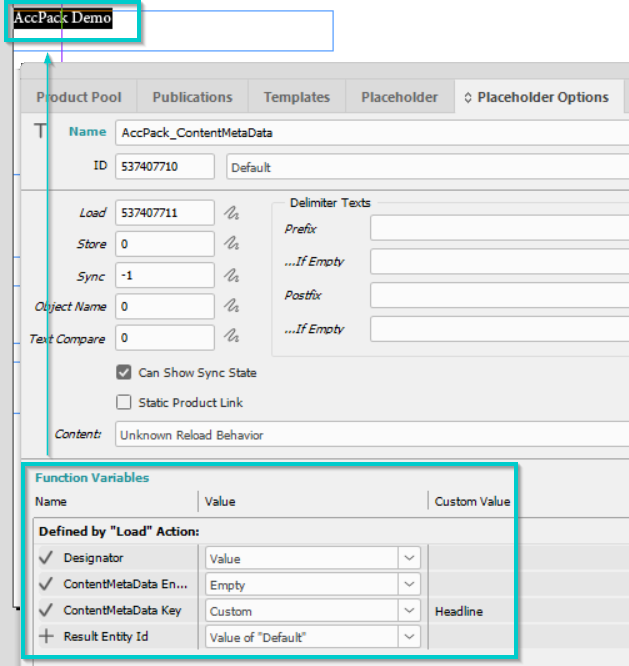
Figure 3: Result
Text "AccPack Demo" is displayed.
Further Reading
- DocumentParameter — reads document parameters instead of entity metadata