General Concepts
Placeholders and InDesign Connection
A placeholder serves as the functional link between an Adobe InDesign frame and the data stored in the priint:suite ecosystem. Consultants assign a placeholder to a selected frame using the priint:comet InDesign Plugins, which identifies the frame with a unique placeholder ID. Once assigned, the placeholder dictates how content—such as text, images, or tables—is rendered within that specific layout element based on its configuration.
Data Providers and Placeholders using AccPack Methods
A data provider is responsible for the retrieval and transformation of information into a format usable by the layout engine. AccPack methods act use standardized data providers by offering best-fit approaches for data-query and data-mapping mechanisms. These placeholders eliminate the need for project-specific Java development by providing pre-built logic for common tasks, such as finding a parent record in a hierarchy or aggregating multiple attributes into a single string.
Composability of methods is a big advantage of using separate data query and data mapping methods. Find out more about these concepts in the general priint:suite documentation.
Configuration in ISON
All placeholders rely on data providers that will prepare the data that will be evaluated in the placeholder.
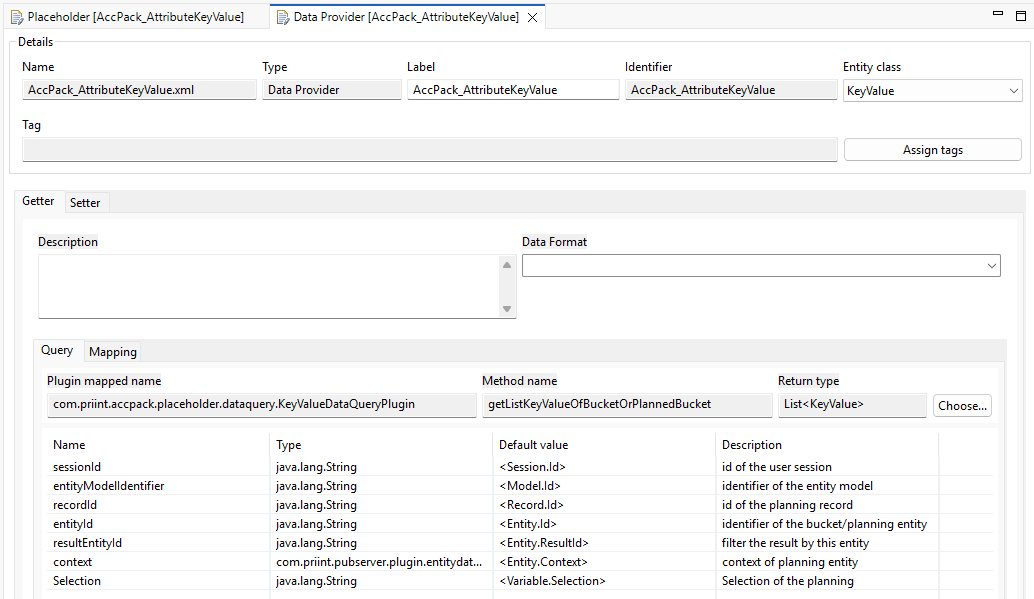
Data Query
Data query retrieves the raw data for the placeholder. It is a general priint:suite concept, see Generic Placeholders. The screenshot below shows an example configuration used by the generic placeholders.
Data Mapping
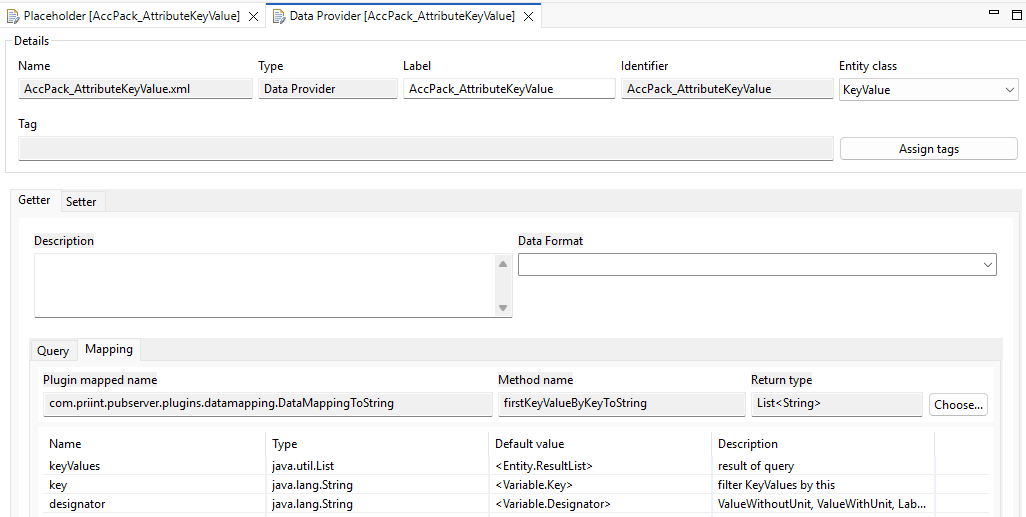
Data mapping transforms the queried data into the format the placeholder renders. It is a general priint:suite concept, see Generic Placeholders. The screenshot below shows an example configuration used by the generic placeholders.
Data processing
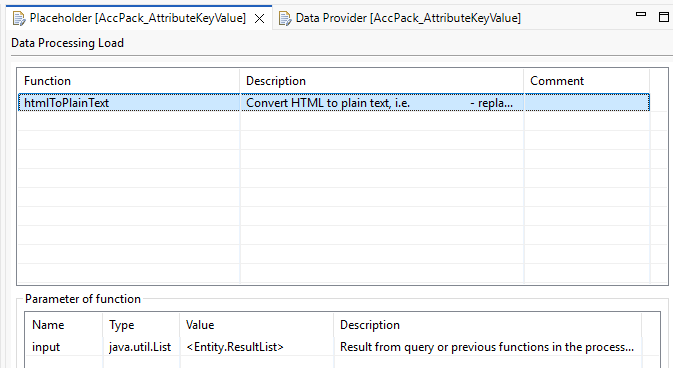
Some placeholders add one or more data processing step that post-processes the placeholder output. It is a general priint:suite concept, see Data processing. The screenshot below shows an example configuration used by the generic placeholders.
Depending on your data you might want to duplicate the default placeholder from the Accelerating Pack and change data processing methods. This makes sense, when your KeyValue- or Text-Entities contain HTML tags. The data processing defines how HTML tags in your data should be processed. The default Data processing htmlToPlainText will strip all HTML tags. The htmlToTaggedText will instead try and convert the HTML tags inside your data to Text the InDesign can process (TaggedText).
The Role of Function Variables
Function variables allow consultants to define and adjust placeholder behavior directly within the "Placeholder Options" dialog in InDesign without modifying any underlying code. By configuring variables such as Key, Designator, Selection, and Result Entity ID, a consultant can control:
-
Data Selection: Filtering which specific records are displayed (e.g., only JPG images or specifically selected planning content).
-
Formatting: Choosing which fields of a record to show, such as a value with or without units.
-
Logic: Implementing complex retrieval rules, such as AND/OR gates for attribute lists or defining how many levels to traverse up or down a product tree.
Result Entity ID
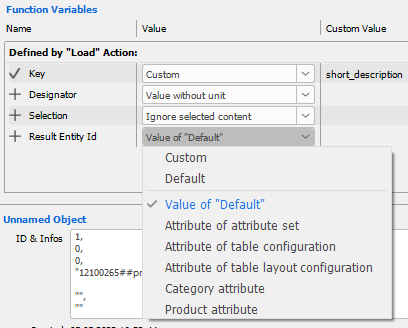
This variable could be set to define which would be the entity the placeholder would get result from:
-
Category attribute: if the value is an attribute of a Category
-
Product attribute: if the value is an attribute of aProduct
-
Attribute of attribute set: if the value is from an attribute defined by attribute set
-
Similar for Attribute of table configuration / Attribute of table layout configuration
Supported Entity Types
The AccPack methods cover a comprehensive range of entity types to support diverse publication needs, such as:
-
Key Values: Managed via placeholders like
AccPack_AttributeKeyValue, these retrieve specific attributes (e.g., color, weight) assigned to a bucket or planning record. -
Text:
AccPack_Textis used for rich or raw text content (content blocks), such as long-form marketing copy and descriptions. -
Media Assets: Multiple placeholders (e.g.,
AccPack_MediaAsset,AccPack_MediaAssetLabel) handle images by searching labels with regular expressions, using unique identifiers, or following PIM relations. -
Document Parameters:
AccPack_DocumentParameterloads values set at the document or publication level, such as a "Catalog Year" or a "Chapter Title". -
Bucket Templates:
AccPack_BucketTemplatesandAccPack_ChildBucketTemplatesare used for multi-frame layouts, automatically placing sub-templates for every matching bucket found in the data hierarchy. -
Metadata:
AccPack_ContentMetaDataevaluates metadata assigned to entities such as planning records and buckets. -
Static Content:
AccPack_StaticContentloads fixed text from astaticContent.xmlfile, varied by language, country, assortment, or well.
General Concepts
These two concepts apply across all placeholder methods in this package:
- Selection Function Variable — controls how planning record selections affect which content is returned
- Context Definition — controls how
_languageand_countrycontext parameters are applied