Upload to FTP
Overview
Accpack Upload SFTP is a working example process that demonstrates how to collect PDF files from a document's folder in Object Storage and upload them to a destination FTP or SFTP server. While it can be used, it is intended as a starting point, not a finished, production-ready solution.
The process keeps the logic simple: it collects all PDFs for a given document and uploads them all. In a real implementation you would typically embed the upload step into your own PDF publishing process, adding logic to match your specific requirements.
Installation
The deployment package is available on the priint webftp storage, in the priint_suite_accpacks folder under AccPackUploadToFtp. Please contact our support for access.
To deploy the package, see Using Accelerating Package in your Project. This will install the required plugins.
Deploy the included AccPack Upload Sftp.bpmn as a Camunda process separately. The process definition is also available as a download at the bottom of this page.
Before running the process, confirm that:
- You have access to the destination FTP/SFTP server with credentials and write permission to the target folder.
- PDF files for the document already exist in MinIO at the document's PDF folder path.
Configure FTP Credentials in Payara
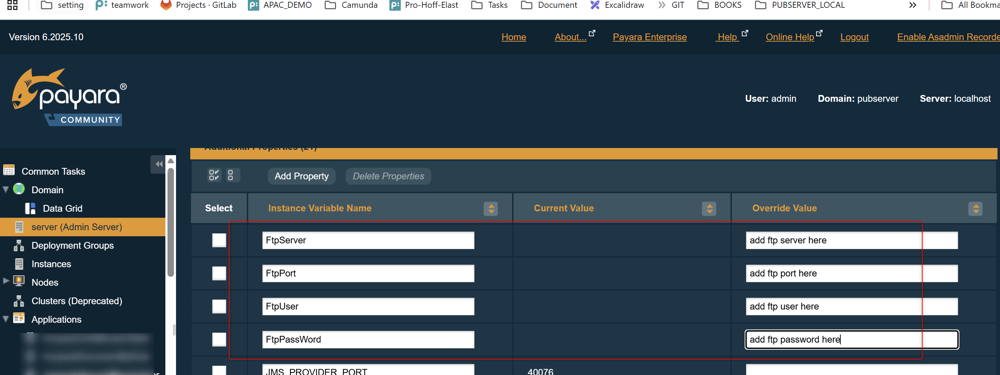
Store the FTP connection details as Payara server properties rather than hardcoding them in the BPMN. Go to Payara Admin → Server (Admin Server) → Properties and add the following:
| Property | Required | Description | Example |
|---|---|---|---|
FtpServer | Yes | Hostname or IP address of the FTP/SFTP server. | ftp.priint.com |
FtpPort | Yes | Port number. Only 21 (FTP) and 22 (SFTP) are supported. | 22 |
FtpUser | Yes | Username for authentication. | priint_user |
FtpPassword | Yes | Password for authentication. | •••••••• |
Process Definition
| Name | Identifier | Object Type | Process Type |
|---|---|---|---|
| AccPack Upload Sftp | ACCPACK_UPLOAD_SFTP | Document | SERVICE_PROCESS |
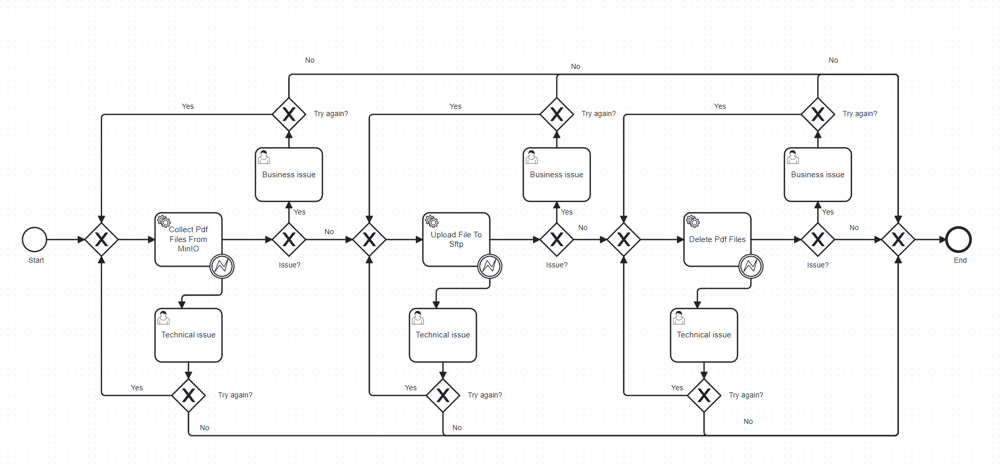
1. Collect PDF Files From Object Storage
Queries the document's PDF folder in object storage and returns a list of PDF filenames based on the documentId and the selected pdfProfiles list.
- If
pdfProfilesis provided, only return PDF files that match the pattern:documentId + pdfProfile. - If
pdfProfilesis empty, return only the default PDF file containingdocumentId.pdf. - If no matching files are found, the process marks itself as failed and does not proceed to the upload step.
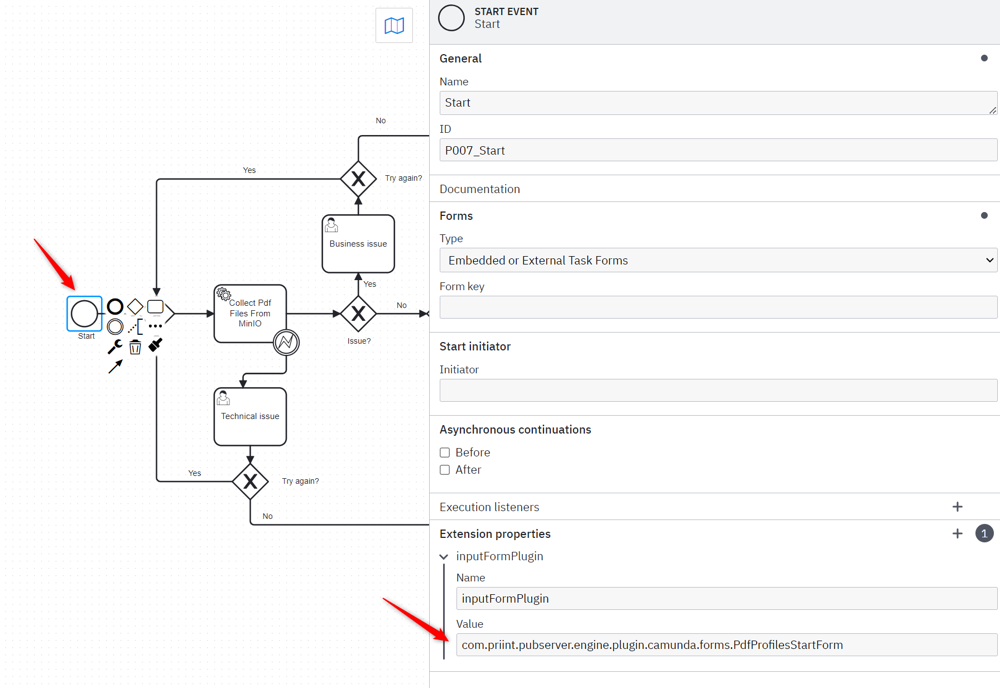
If the process runs as a main process, the start point provides a pdfProfiles list. If ACCPACK_UPLOAD_SFTP is used as a subprocess and the main process already provides pdfProfiles, use the start point without the form to avoid duplicate profile selection.
2. Upload File To SFTP
The process retrieves the PDF files directly from object storage and uploads them to the FTP/SFTP server.
For each PDF file:
-
Streams the file directly from object storage to the FTP server.
-
Builds a new filename using the optional
PREFIXandSUFFIXparameters:{PREFIX}{original_filename_without_extension}{SUFFIX}{.extension}Example:
document_12345.pdfwithPREFIX=priint_andSUFFIX=_V1.0.0→priint_document_12345_V1.0.0.pdf -
Uploads the file under the new filename. The original file in MinIO is never modified.
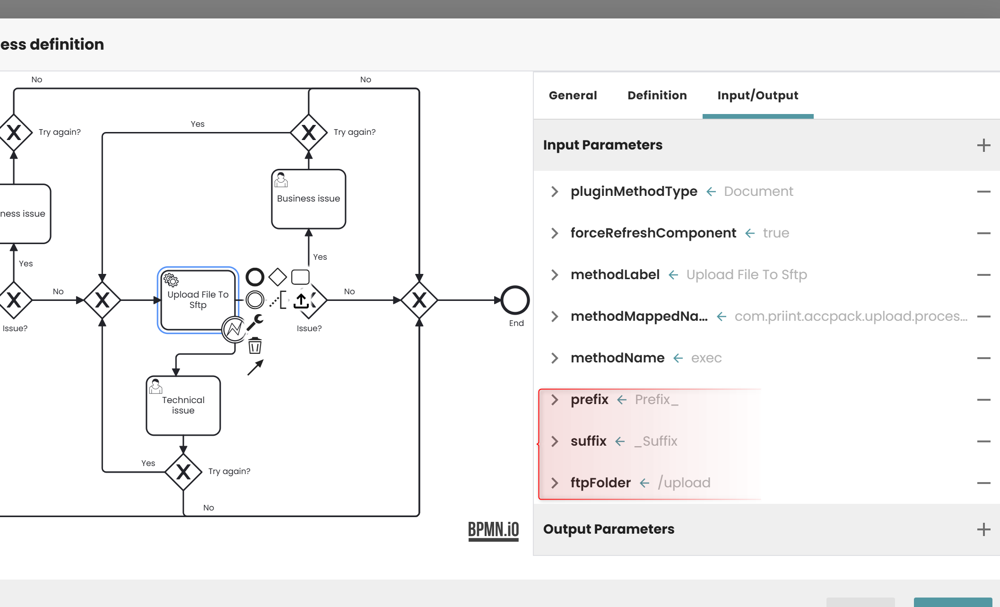
The PREFIX and SUFFIX values can be set as input parameters on the task or passed from a parent process.
3. Delete PDF Files From Object Storage
To clean up after upload, the "Delete PDF Files From Object Storage" step removes the files collected in step 1 from MinIO. This step is optional.
Parameters
The process uses two kinds of input. Static values (FTP connection details) are defined in the BPMN on the service task. Dynamic values are provided at runtime by the planner when starting the process.
The variables documentId, project, and tenant are provided automatically when starting the process with object type Document. The pdfFilesName list is produced by step 1 and passed forward automatically. It is not configured manually.
Collect PDF Files From Object Storage
| Parameter | Required | Description | Example |
|---|---|---|---|
pdfProfiles | No | List of PDF profile names to filter which files are collected. If empty, only the default PDF is returned. | print, web |
Upload File To SFTP
| Parameter | Required | Description | Example |
|---|---|---|---|
pdfFilesName | Yes | List of PDF filenames to upload. Produced by step 1. Not configured manually. | |
prefix | No | Text added before the filename (without extension) when uploading. | priint_ |
suffix | No | Text added after the filename (without extension) when uploading. | _V1.0.0 |
ftpFolder | No | Remote folder path to upload into. Defaults to /{FtpUser} if empty. | /upload |
Delete PDF Files From Object Storage
| Parameter | Required | Description |
|---|---|---|
pdfFilesName | Yes | List of PDF filenames to delete. Produced by step 1. Not configured manually. |
Known Limitations
- All PDFs are collected: The process uploads every PDF in MinIO for the document, regardless of which profile generated it. Running the process multiple times accumulates files and uploads them all on each run.
- Credentials in the BPMN: The BPMN contains placeholder FTP credentials in the task parameters. Move these to Payara server properties (see Installation) before using in any real environment.