BucketDocumentParameterKeyValue
Overview
1. AccPack_BucketDocumentParameterKeyValue
The AccPack_BucketDocumentParameterKeyValue gets the key value of a bucket that is assigned to a document parameter.
2. Architectural Decision: When to use this Placeholder
A consultant needs the AccPack_BucketDocumentParameterKeyValue placeholder specifically when the target data does not reside in the bucket currently linked to the frame or planning record, but instead lives in a bucket referenced by a document parameter.
Common Use Case: In complex publications, certain "global" attributes (like a Chapter Name or Brand Description) might be stored in a bucket assigned to a document-level parameter (e.g., a parameter named "Parent Page" or "Chapter Metadata"). This placeholder allows the template to "reach out" and retrieve specific key-values from that document-level bucket regardless of the individual product currently being rendered on the page.
Technical Specification
Placeholder type: Text
Entity: Works with bucket records
Function Variables
-
Document Parameter: The unique identifier of the document parameter to which the bucket is assigned.
-
Key: Defines the specific key of the record to be retrieved. If left empty, the placeholder retrieves the first available key-value.
-
Designator: Defines the output format. Supported values include: Value without Unit, Value with Unit, Label, Symbol, Unit, and Parent Identifier.
-
Result Entity Id: The entity identifier of the key-value result (e.g.,
product_attribute).
Developer Specifications
-
Data Query:
com.priint.accpack.placeholder.dataquery.KeyValueDataQueryPlugin.getListKeyValueOfBucketByDocumentParameter. -
Data Mapping:
com.priint.pubserver.plugins.datamapping.DataMappingToString.firstKeyValueByKeyToString. -
Data Processing:
-
htmlToPlainText: Removes all HTML tags (Default). -
htmlToTaggedText: Converts HTML tags intopriint:comettagged text for InDesign to maintain styles.
-
Global Configuration Logic
1. Context Definition
Generic placeholders default to using the _language and _country parameters. For high-standard implementations, this behavior should be configured globally within the project settings to ensure consistency across the publication.
For more details please kindly check Context Definition
2. Selection Variable Logic
While this placeholder primarily targets document parameters, it remains compatible with standard selection logic if a planning record is assigned:
-
Ignore selected content: Recognizes all key-value records in the parameter bucket.
-
Only selected content: Only returns values if they are explicitly selected in the planning record.
-
Use all if no content selected: Acts as the fallback state, returning all available records from the bucket.
Technical Environment & Deployment
Consultants could find guide for deployment of generic placeholders here: installation & configuration
Demonstration & Implementation Examples
Demo data for example:
Figure 1: Bucket parameter to be displayed in priint:neowise
-
Document parameter:: Chapter Name
-
Bucket document: Beginner
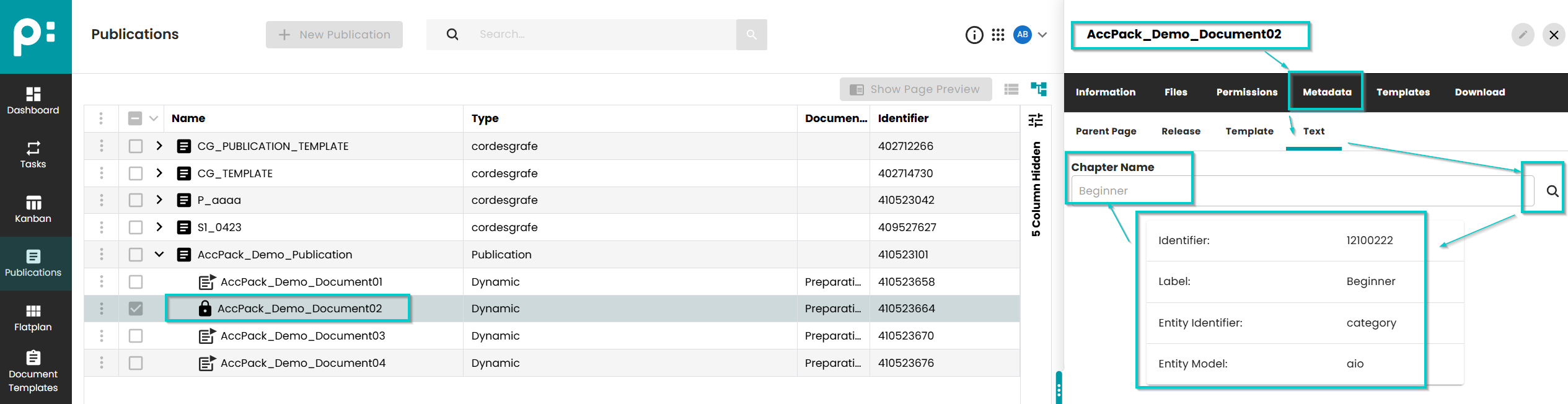
Figure 2: Prepared data to be displayed in priint:admin
-
Bucket document: Beginner
-
Key: headline
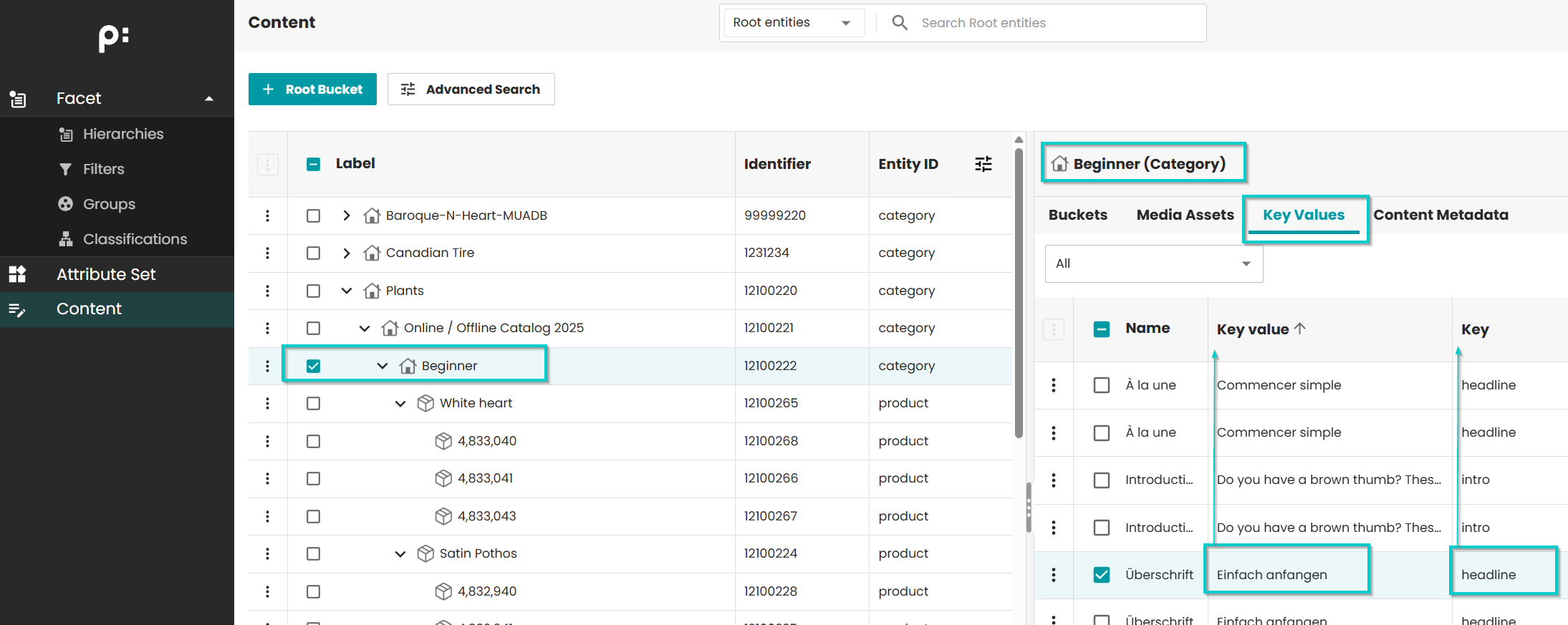
Figure 3: Configuration of Placeholder Options
- Document parameter: chapter_name
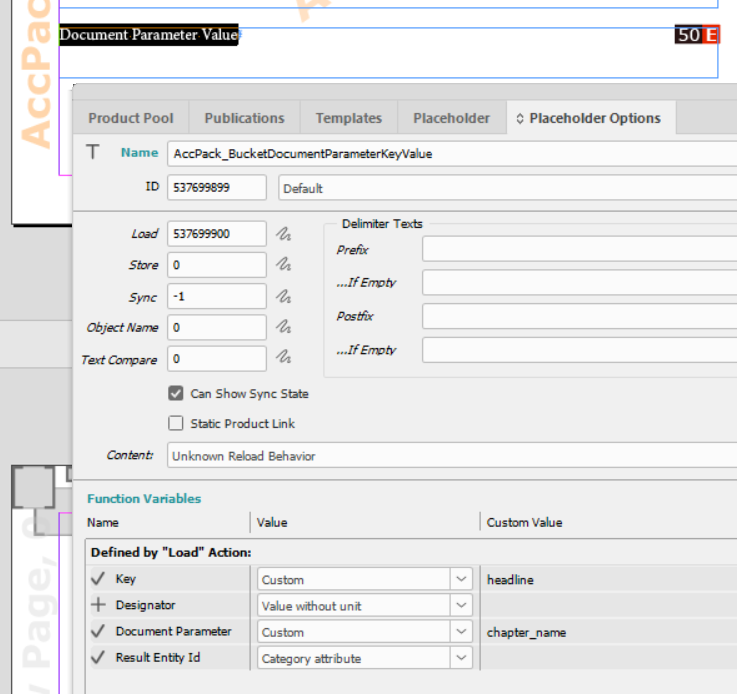
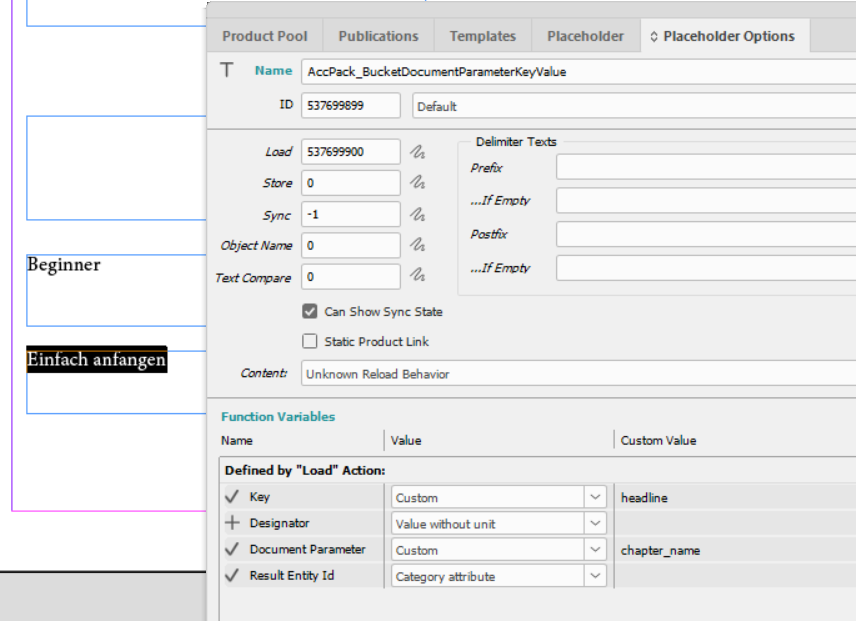
Figure 4: Result
Text from the key "headline" from "Beginner" bucket is displayed.
Further Reading
- Context Definition
- BucketDocumentParameterLabel — gets the label of the bucket assigned to a document parameter
- AttributeKeyValue — gets a key value from the currently linked bucket