AttributeKeyValue
Overview
1. AccPack_AttributeKeyValue
The AccPack_AttributeKeyValue is the standard placeholder to get a key value of a bucket or planned bucket.
2. Placeholder Categorization: Key Value vs. List vs. Text
To ensure optimal performance and template maintainability, developers must select the appropriate placeholder type based on the data structure of the PIM source.
| Placeholder | Primary Function | Return Type | Ideal Use Case |
|---|---|---|---|
| AccPack_AttributeKeyValue | Retrieves a single specific key-value record from a bucket or planning record. | String (Single Value) | Standard product attributes (e.g., Color, Weight, Short Description). |
| AccPack_AttributeKeyValueList | Collects and aggregates multiple key-value records based on logic gates or patterns. | List of Strings | Feature lists, technical specification blocks, or dynamic attribute sets. |
| AccPack_Text | Outputs raw text records from a data record based on specific search strings. | String (Raw Text) | Long-form marketing copy, disclaimers, or unformatted text blocks. |
3. Comparison between AccPack_AttributeKeyValue and AttributeKeyValueFromParent
| Placeholder Name | Primary Data Source Location | Linkage Logic |
|---|---|---|
| AccPack_AttributeKeyValue | Current Level (Current Bucket / Planned Bucket) | Direct link; retrieves data assigned to the current record. |
| AccPack_AttributeKeyValueFromParent | Parent / Higher Level (e.g., pulling Product data for an Article) | Automatic parent determination; offloads upward traversal work to the plugin. |
4. Architectural Decision: KeyValue vs. KeyValueList
Use AccPack_AttributeKeyValue when the layout requires a precise, isolated attribute. Select AccPack_AttributeKeyValueList for "combined" attributes (e.g., merging "Width," "Height," and "Depth" into a single string) or when the required attributes are dynamic and must be gathered using regular expression patterns.
Technical Specification:
Placeholder type: Text
Entity: Works with planning records and bucket records
Function Variables
-
Key: The unique identifier for the specific record.
-
Designator: Defines the output format. Supported values: Value without Unit, Value with Unit, Label, Symbol, Unit, Parent Identifier.
-
Selection: Filtering logic (see Selection Variable Logic below).
-
Result Entity ID: Identifier of the key-value result entity.
Tip: Parent Traversal For scenarios requiring data from a parent bucket, use the AccPack_AttributeKeyValueFromParent variation. This automatically determines the parent of the linked bucket or planning record, allowing you to traverse the entity tree (e.g., from Article up to Product) without manual ID linking.
Developer Specifications
-
Data Query:
com.priint.accpack.placeholder.dataquery.getListKeyValueOfBucketOrPlannedBucket -
Data Mapping:
com.priint.pubserver.plugins.datamapping.DataMappingToString.firstKeyValueByKeyToString -
Data Processing:
-
htmlToPlainText: Strips all HTML. -
htmlToTaggedText: Essential for maintaining PIM-defined typography/styles by converting HTML tags into priint:comet tagged text for InDesign.
-
Global Configuration Logic
1. Context Definition
Generic placeholders default to using the _language and _country parameters. For high-standard implementations, this behavior should be configured globally within the project settings to ensure consistency across the publication.
For more details please kindly check Context Definition
2. Selection Variable Logic
The "Selection" variable determines how the placeholder behaves when a planning record is assigned in the Planner UI:
-
Ignore selected content: Recognizes all key-value records in the parameter bucket.
-
Only selected content: Only returns values if they are explicitly selected in the planning record.
-
Use all if no content selected: Acts as the fallback state, returning all available records from the bucket.
Technical Environment & Deployment
Consultants could find guide for deployment of generic placeholders here: installation & configuration
Demonstration & Implementation Examples
Demo data for example:
-
Pre-defined template:
-
Name: AccPack Demo Generic Template
-
ID: 410471354
-
Figure 1: Placeholder Options configuration for plant name
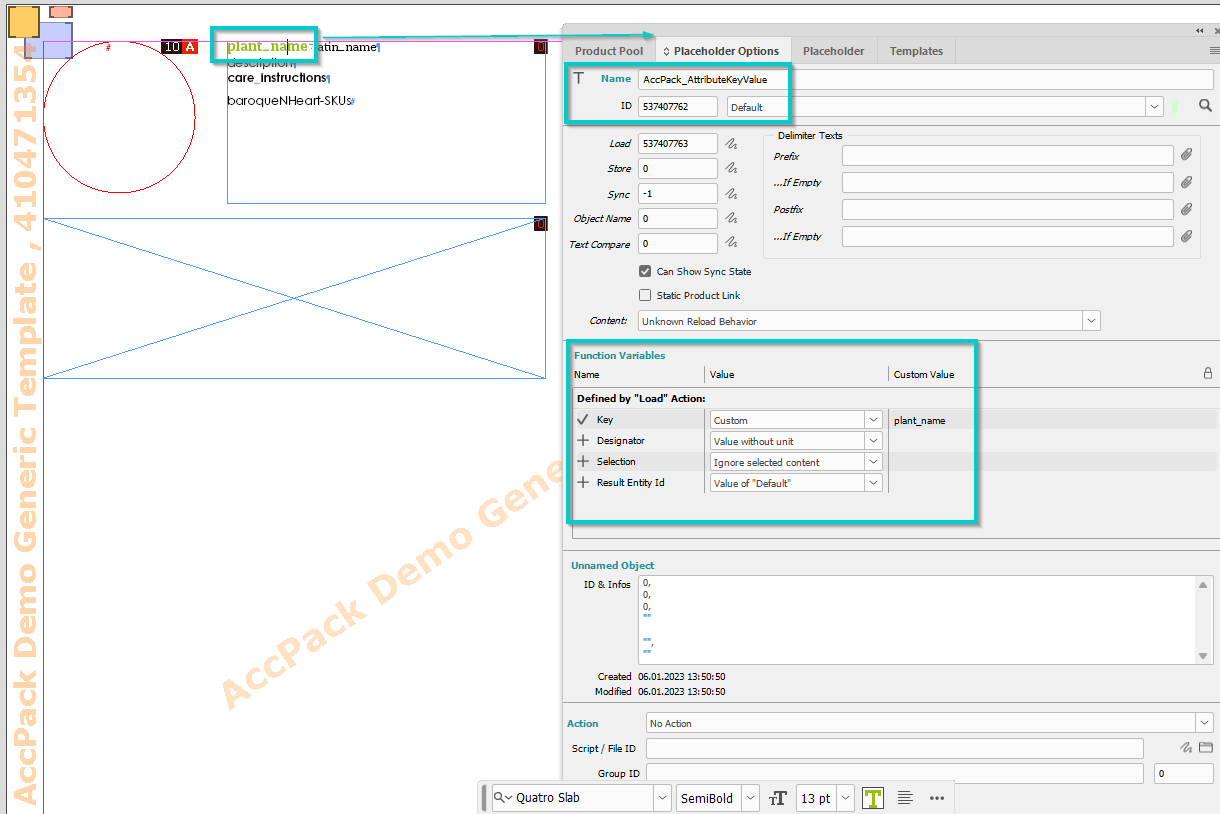
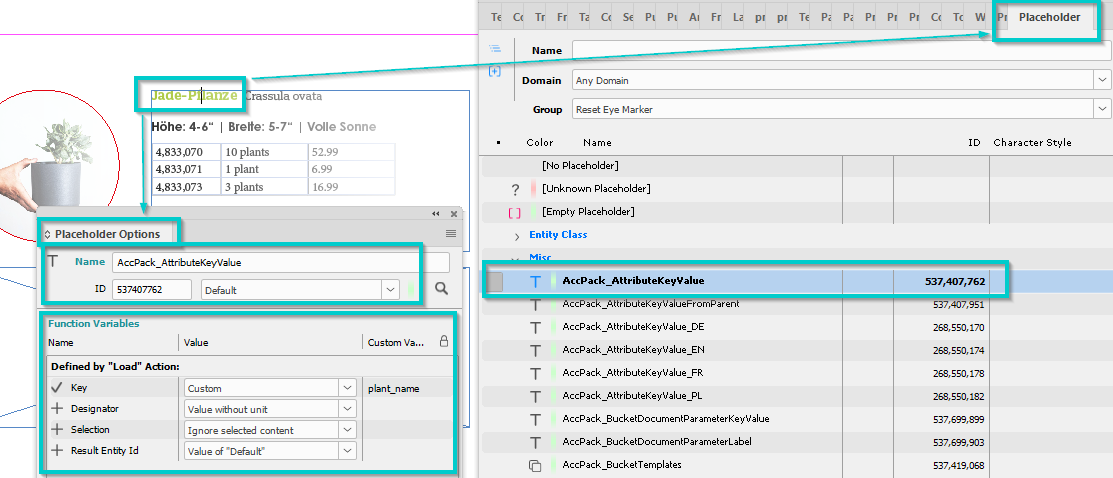
Figure 2: Result
Further Reading
-
AttributeKeyValueFromParent — retrieves a key value from the parent bucket
-
AttributeKeyValueList — retrieves multiple key values as a list