Area and Sizing
Area of Index Tabs
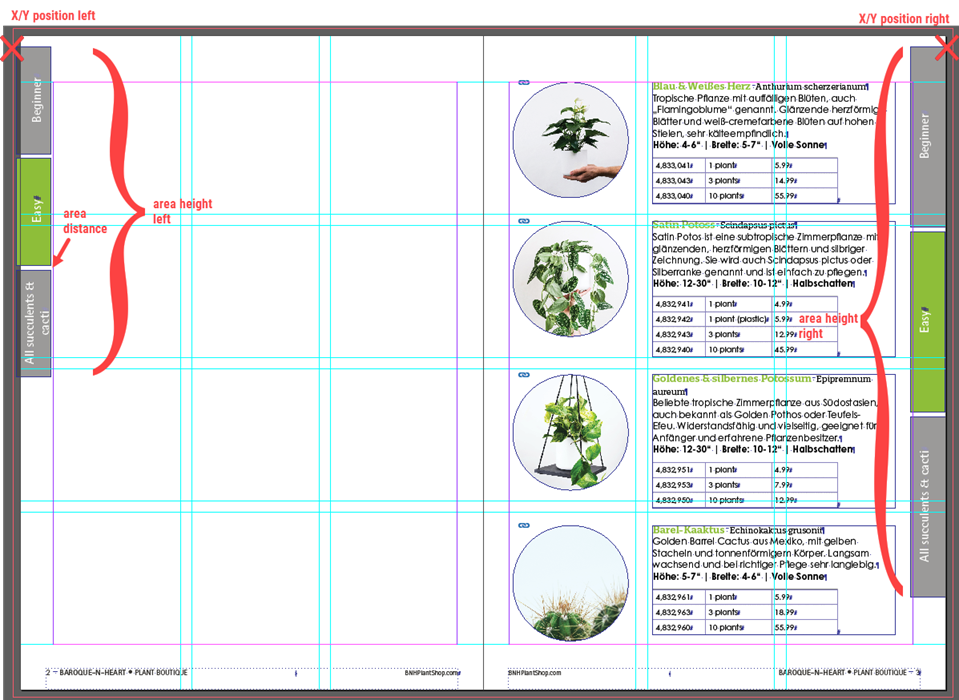
The area can be defined for left and right pages separately.
Positioning:
- Top-Left corner for left pages, Top-Right corner for right pages (see X-mark in the screenshot)
Area Width:
- Defined by the template widths
Area Height:
- When using Autosize:
metadata values Tab Area Height - Left Page and Tab Area Height - Right Page
- When not using Autosize:
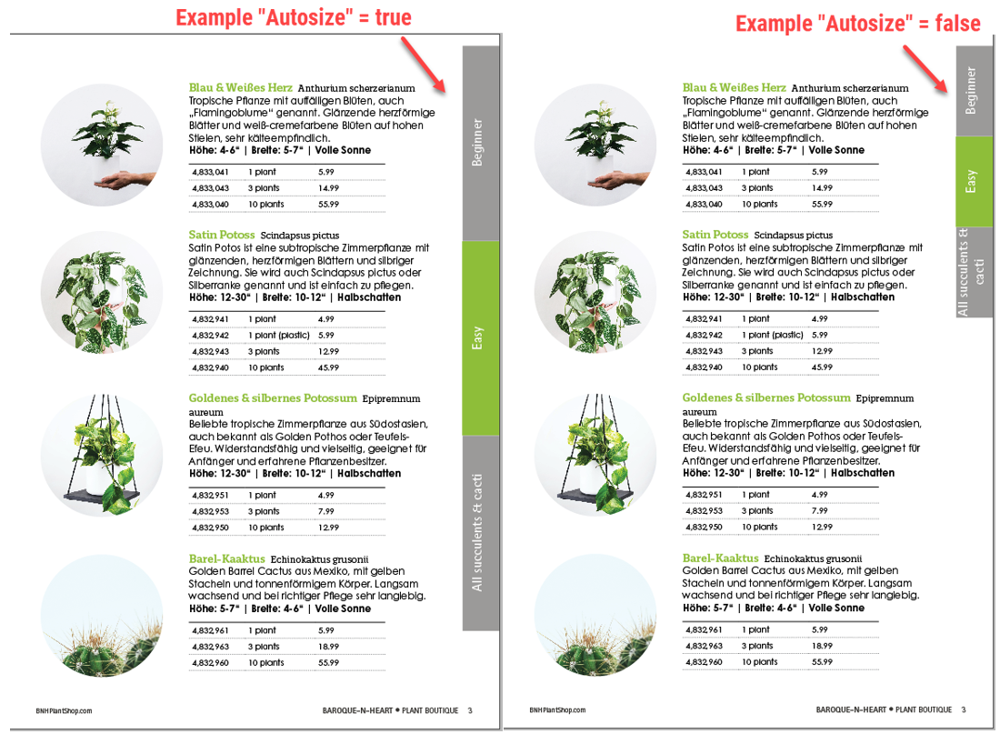
Calculated by the height from template, number of tabs (and Tab Area Distance Tab). In this case the implementation won't fit all tabs on the page. All tab templates are simply placed underneath each other.
Autosize
The height of the tab frames is adjusted according to the metadata values Tab Area Height, (Tab Area Distance Tab) and the number of Index Tabs. The height of the tabs is always the same for all tabs, active and inactive ones. The formula is: tab height = (area height − (number of tabs − 1) × distance) / number of tabs.
All coordinate and dimension metadata values are specified in millimetres. The script converts them to points internally.
This option works regardless of whether all tabs are displayed on a document or only the active one.
The Autosize feature usually is used when creating digital or even interactive versions of a catalog.
When not using ***Autosize,***the template creator must take care of the tab height definition to fit all tabs on the page. This will be necessary when creating the print version of a catalog and using cutting dies – usually the print service provider has exact requirements for size and position.
Metadata
| Name | Identifier | Description |
|---|---|---|
| Autosize | itab_autosize (checkbox) | yes = the height of the tabs is calculated based on the height of the tab area |
Tab Area Distance Tab | itab_area_distance | Distance in Millimetres between tabs. This value is the same for all tabs and pages. | |
LEFT PAGE | Tab Area Left Page - Top Left Pos X | itab_area_topleft_posx_left | The X/Y coordinate of the top left position, where the index tabs for a left page are to be placed in Millimetres. Negative values are allowed to support the bleed area. |
Tab Area Left Page - Top Left Pos Y | itab_area_topleft_posy_left | ||
Tab Area Height - Left Page | itab_area_height_left | Height of the area, where the index tabs for a left page are to be placed | |
RIGHT PAGE | Tab Area Right Page - Top Right Pos X | itab_area_topright_posx_right | The X/Y coordinate of the top right position of the right, where the index tabs for a right page are to be placed in Millimetres. Negative values are allowed to support the bleed area. |
Tab Area Right Page - Top Right Pos Y | itab_area_topright_posy_right | ||
Tab Area Height - Right Page | itab_area_height_right | Height of the area, where the index tabs for a right page are to be placed when using Autosize (in Millimetres) |