Generic Import Excel Format
Overview
The Generic Import Profile is the default standardized Excel structure for the Data Import AccPack. If your data fits this structure, you can use the default import without any custom configuration. This page explains only the file format. For the XML mapping configuration and custom import structures, see XML Configuration.
The sample files at the end of this page contain a complete demo data set and a minimal sample. Use them as a starting point and fill in your own data.
Sheets
The Generic Import Profile consists of four sheets:
- Data: all buckets and their content (key values, media assets). One row per bucket.
- KeyValueTranslation: key label translations. Do not rename or change the header columns.
- MediaAssetTranslation: media asset label translations. Do not rename or change the header columns.
- MappingInformation: reference sheet explaining how to name header columns. Not used for import.
Do not rename the Data, KeyValueTranslation, and MediaAssetTranslation sheets.
The sample files also contain the sheets Bucket, Attribute, Price, MediaAsset, and MediaObject. These belong to an older import structure and are not part of the Generic Import Profile.
Data Sheet
The Data sheet contains one bucket per row. The columns are grouped into three areas: bucket columns, key value columns, and media asset columns.

Bucket


In the Data sheet, bucket information is defined by columns with the prefix Bucket_*.
Note: if a template or page template does not exist in the system, it will not appear in the UI even if saved to the database.
Key Value
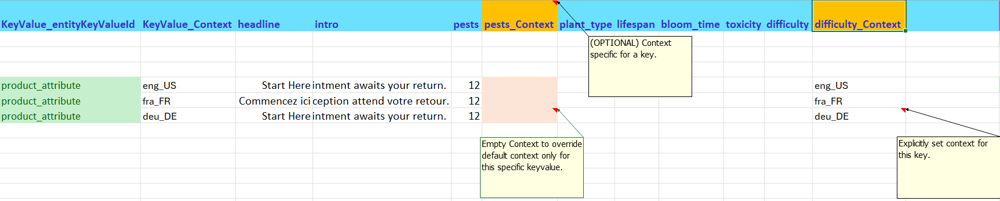
In the Data sheet, key value columns follow this pattern:
- The first column is always named
KeyValue_entityKeyValueId - The following columns are the keys (e.g.
headline,intro) - Key labels can be translated per context using the KeyValueTranslation sheet
Context priority for key values:
- If a
*_Contextcolumn next to a key column is defined, it controls that key's context - Otherwise,
KeyValue_Contextapplies - Otherwise,
Bucket_Contextapplies
Empty values:
- If a key value is empty, it is not saved to the database
- To force-save an empty value, use
(empty)as the cell value
Key Value Translation

In the KeyValueTranslation sheet, define translated labels for each key. The sheet has three columns: Key, Label, and Context.
Media Asset
The start column for media assets is always MediaAsset_entityMediaAssetId.
There are two ways to define a media asset:
Simple

- No context, no translated label
- The image label, URL, or path is detected from the row value (e.g.
mainimage,productimage) - Column headers must not contain
MediaAsset_(exceptMediaAsset_entityMediaAssetId)
Example:
mainimagevalueC:\images\baroquenheart\main_green.ai→ labelmain_green, filemain_green.ai, pathC:\images\baroquenheart\productimagevaluehttps://superserver.com/icons.jpeg→ URLhttps://superserver.com/icons.jpeg
The simple media asset syntax supports server volume paths. A mainimage column may contain the value file-system/aio/main_green.ai, where file-system/aio is the server volume and main_green.ai is the relative path to the file.
Detailed

- Supports multiple contexts, delimited by
/(e.g.eng_US/fra_FR) - Media asset label can be translated via the MediaAssetTranslation sheet
- Column headers must contain the
MediaAsset_prefix
In the sample files, a detailed media asset uses the columns MediaAsset_entityMediaAssetId, MediaAsset_label, MediaAsset_sequence, MediaAsset_filename, MediaAsset_path, and MediaAsset_type. To define more than one media asset per bucket, repeat this column block. The demo data set uses up to four blocks per row.
Media asset context is not yet supported.
Media Asset Path and Server Volumes
The MediaAsset_path column accepts two kinds of values:
- A direct filesystem path (e.g.
C:/images/baroquenheart/). This path is specific to the operating system of the server. - The path of a server volume (e.g.
file-system/aio). We recommend this option.
With a server volume path, the Excel file contains no OS-specific paths, so the same file works on Windows and Linux servers.
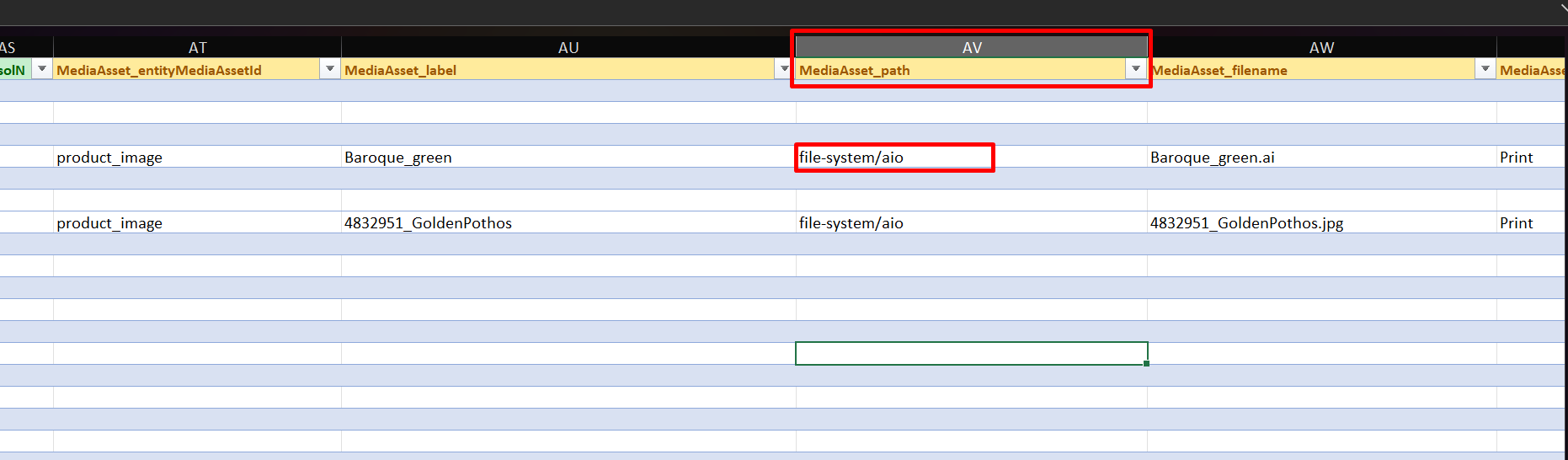
The value must match the path of a server volume defined in the Publishing Server volume configuration (ServerConfig.xml, with custom settings in custom_ServerConfig.xml). See Server Volume Configuration in the installation section. In this example, the volume is an object storage volume, marked with the tag object-storage:
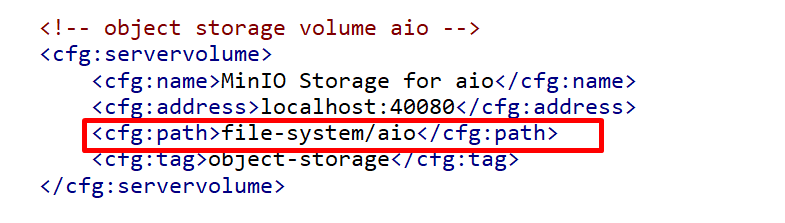
During import, the system verifies the referenced server volume. If it matches a configured server volume, the media asset is marked as object storage content (IN_OBJECT_STORAGE = 1 in the database).
If no matching server volume is found, the import continues without interruption. The media asset is not resolved, and no image is displayed.
- Simple media asset: The system reads the full path from the
mainimagecolumn, splits it, and stores the parts in the database (FILE_NAME,FILE_PATH). - Detailed media asset: The system reads the
MediaAsset_label,MediaAsset_path, andMediaAsset_filenamecolumns to locate the image.
The image files must exist in the referenced volume. For uploading the demo images, see the notes in the examples.
Media Asset Label Translation

In the MediaAssetTranslation sheet, define translated labels for each media asset. The sheet has the same three columns as the KeyValueTranslation sheet: Key, Label, and Context.
Context
Context columns (Bucket_Context, KeyValue_Context) use the format language_country (e.g. deu_DE). The country part can be left empty to address only the language (e.g. deu_). The Context column of the translation sheets uses the same format.
Mapping Information

The MappingInformation sheet is a reference guide for naming header columns and supported attributes. It is not used during import and only serves as a reference for the user.
The sheet lists the supported header columns for seven mapping areas:
| Area | Header column | Explanation |
|---|---|---|
| Bucket | Bucket_identifier | Bucket id |
| Bucket | Bucket_label | Bucket label |
| Bucket | Bucket_parentBucketId | Parent bucket id |
| Bucket | Bucket_entityBucketId | Bucket entity |
| Bucket | Bucket_template | Bucket template |
| Bucket | Bucket_pageTemplateId | Bucket page template |
| Bucket | Bucket_sequence | Bucket sequence |
| Key value | KeyValue_key | Key of key value |
| Key value | KeyValue_value | Value of key value |
| Key value | KeyValue_keyLabel | Label of key value |
| Key value | KeyValue_entityKeyValueId | Key value entity |
| Key value | KeyValue_template | Key value template |
| Key value | KeyValue_sequence | Key value sequence |
| Media asset | MediaAsset_label | Media asset label |
| Media asset | MediaAsset_entityMediaAssetId | Media asset entity |
| Media asset | MediaAsset_origin | Media asset origin |
| Media asset | MediaAsset_sequence | Media asset sequence |
| Media asset | MediaAsset_template | Media asset template |
| Media asset | MediaAsset_filename | Media asset filename |
| Media asset | MediaAsset_path | Media asset path or URL |
| Media asset | MediaAsset_type | Media asset type |
| Price | Price_amount | |
| Price | Price_currency | |
| Price | Price_entityPriceId | |
| Price | Price_groupIdentifier | |
| Price | Price_itemPrice | |
| Price | Price_label | |
| Price | Price_listPrice | |
| Price | Price_minOrderQuantity | |
| Price | Price_oldItemPrice | |
| Price | Price_oldPrice | |
| Price | Price_origin | |
| Price | Price_packagingUnit | |
| Price | Price_price | |
| Price | Price_priceUnit | |
| Price | Price_quantityOfPackingUnit | |
| Price | Price_sequence | |
| Price | Price_template | |
| Price | Price_validFrom | |
| Price | Price_validTo | |
| Text | Text_text | Text value |
| Text | Text_entityTextId | Text entity |
| Text | Text_template | Text template |
| Text | Text_sequence | Text sequence |
| Cord | Cord_label | Cord label |
| Cord | Cord_template | Cord template |
| Cord | Cord_sequence | Cord sequence |
| Cord | Cord_entityCordId | Cord entity |
| Cord | Cord_destinationBucketId | Destination bucket id |
| Content metadata | Meta_entityContentMetaDataId | Content meta data entity |
| Content metadata | Meta_key | Content meta data key |
| Content metadata | Meta_value | Content meta data value |
Sample Files
- (Official)BaroqueNHeart_Plants.xlsx: the complete Baroque-N-Heart Plants demo data set. The
MediaAsset_pathvalues use the server volume pathfile-system/aio(see Media Asset Path and Server Volumes), so the same file works on Windows and Linux servers. Your volume configuration must contain a volume with this path. - Sample_NewStructure.xlsx: a minimal sample with a few example rows. It still uses direct filesystem paths.
For an overview of the demo data set and a step-by-step import, see Example.