How-To Implement Custom Methods
1. Introduction
This article describes the methods created and used for Neowise. We have several different types of method:
SEARCH_CONTENTDOCUMENT_NAMESDOCUMENT_CLONEPUBLICATION_CLONEDASHLETAFTER_PLANNING_CREATION
(They are part of PluginMethod.MethodType enum.)
2. Method implementation
To create a new Neowise method, we need to add a new plug-in in a plug-in library project. A new plug-in should implement 4 methods:
String getMethodName(String lang)List<GuiParameter> getParameters(Map<String,Object> params)List<GuiParameter> updateParameters(Map<String,Object> params)- main method with proper method type
2.1 Method Name
The name of method visible in priint:suite is delivered by method getMethodName of the plugin.
The declaration of the method is as follows:
@PubServerMethod(label = "name", type = PluginMethod.MethodType.GENERIC, description = "plugin method called to obtain a translation of plugin label")
  public String getMethodName(
  @PubServerMethodParameter(name = "lang", defaultValue = PubPlannerPlugins.EN, listOfValues = {}) final String lang);
The method gets a string parameter representing current language of priint:suite instance. Thereby the developer can provide translation of the method name.
2.2 UI Dialog Methods
Most of the methods require additional parameters which should be set by user in the runtime. After choosing the method, the UI dialog is shown, rendered on the fly.
- Method name
- Parameter
- Parameter
@PubServerMethod(label = "parameters", type = PluginMethod.MethodType.GENERIC, description = "plugin method called to obtain a list of parameters needed in gui")
public List<GuiParameter> getParameters(
        @PubServerMethodParameter(name = "params") final Map<String, Object> params);
The method returns list of GuiParameter objects. Each element of the list represents one GUI component shown in dialog. The components are rendered from the top to the bottom, in order as they are in the list.
The GuiParameter object can represent the following UI components:
TEXTFIELD- text input
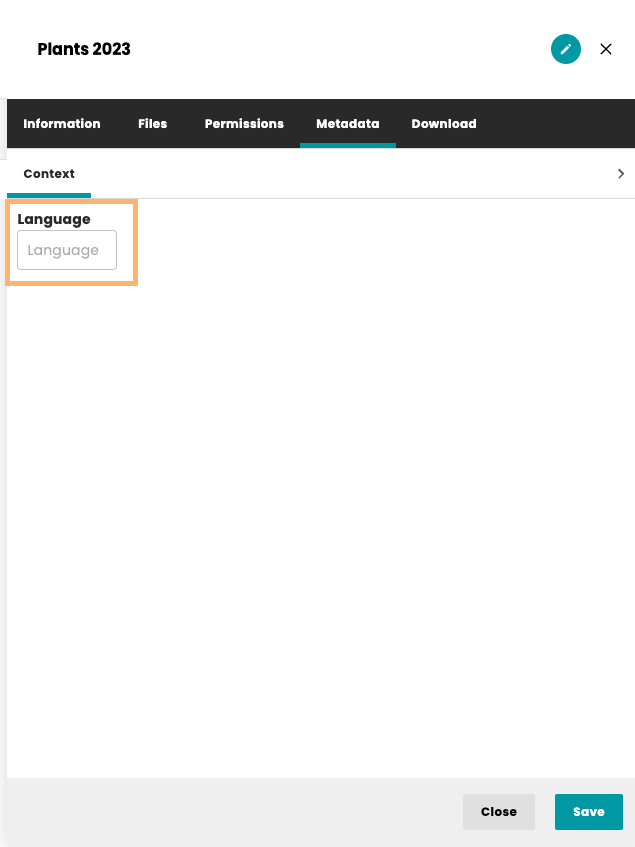
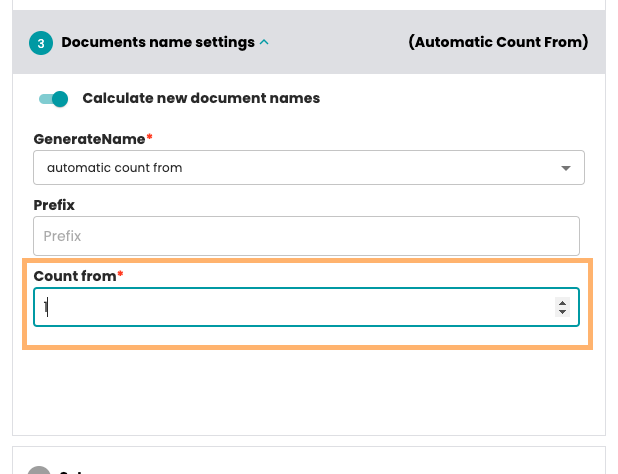
POSITIVE_NUMBER_TEXTFIELD- text input in which the user can only input positive numbers
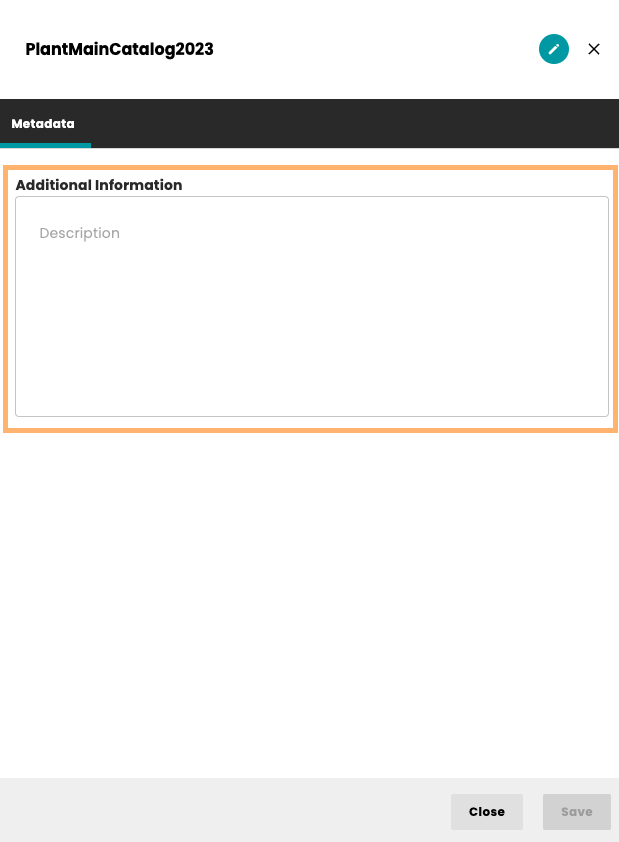
TEXTAREA- text area for longer text
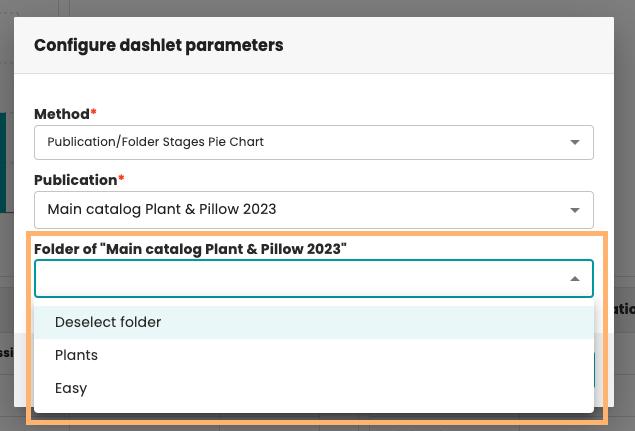
COMBOBOX- dropdown with predefined values
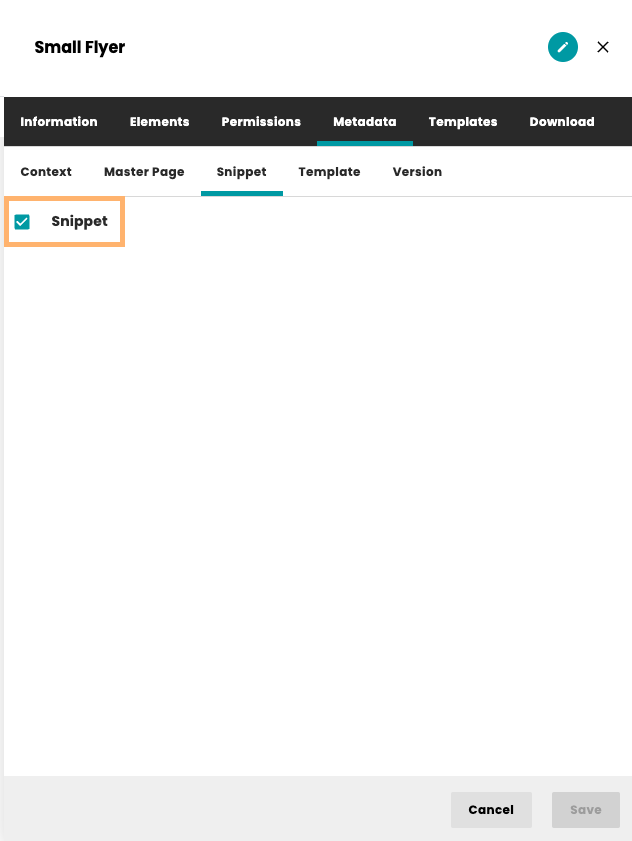
CHECKBOX- checkbox for true/false values
LABEL- text that can be displayed next to the component
REFRESHBUTTON- button for refreshing the UI
LINKBUTTON- button with the link to a specific place in the application
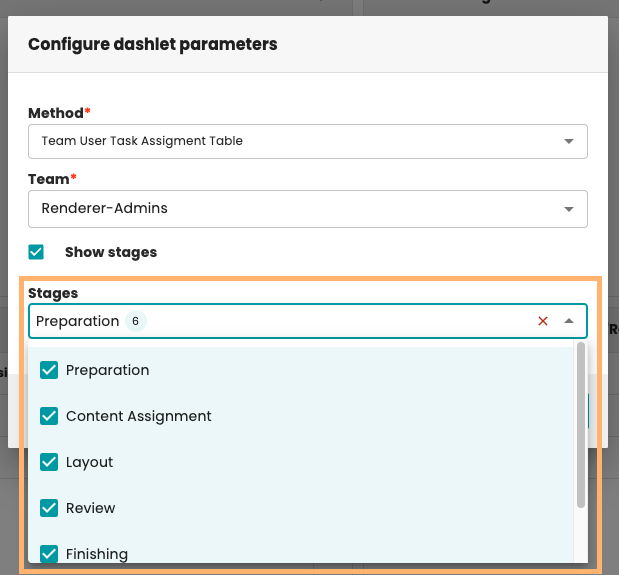
MULTIPLE_COMBOBOX- dropdown with predefined values with the possibility of selecting multiple values
DATEPICKER- component that allows you to select a date. The selected date is stored in the format: 2024/09/17 00:00:00

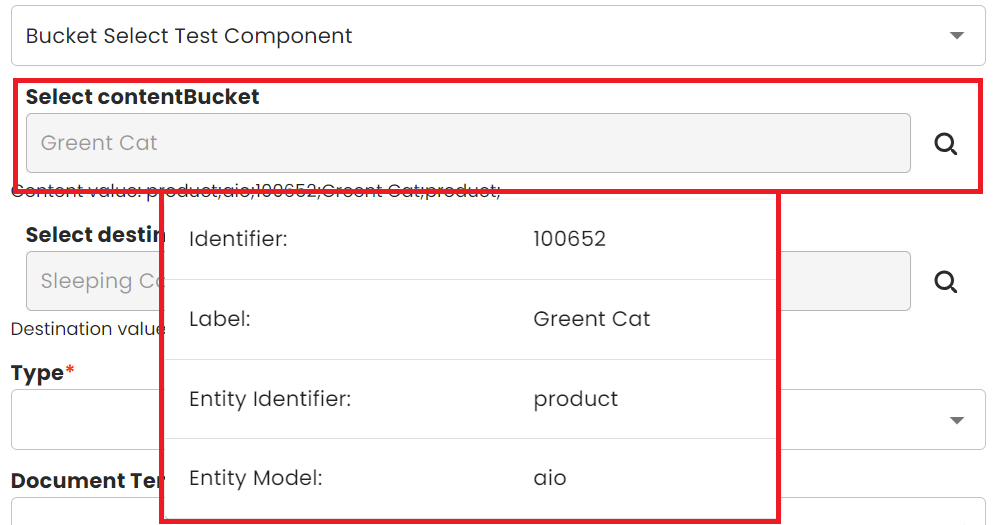
CONTENT_TREE- component that allows you to select bucket. The selected bucket is stored in the format: "entity_id;model_id;bucket_id;label;record_string_id;" eq:product;aio;100651;Action Cat;product;
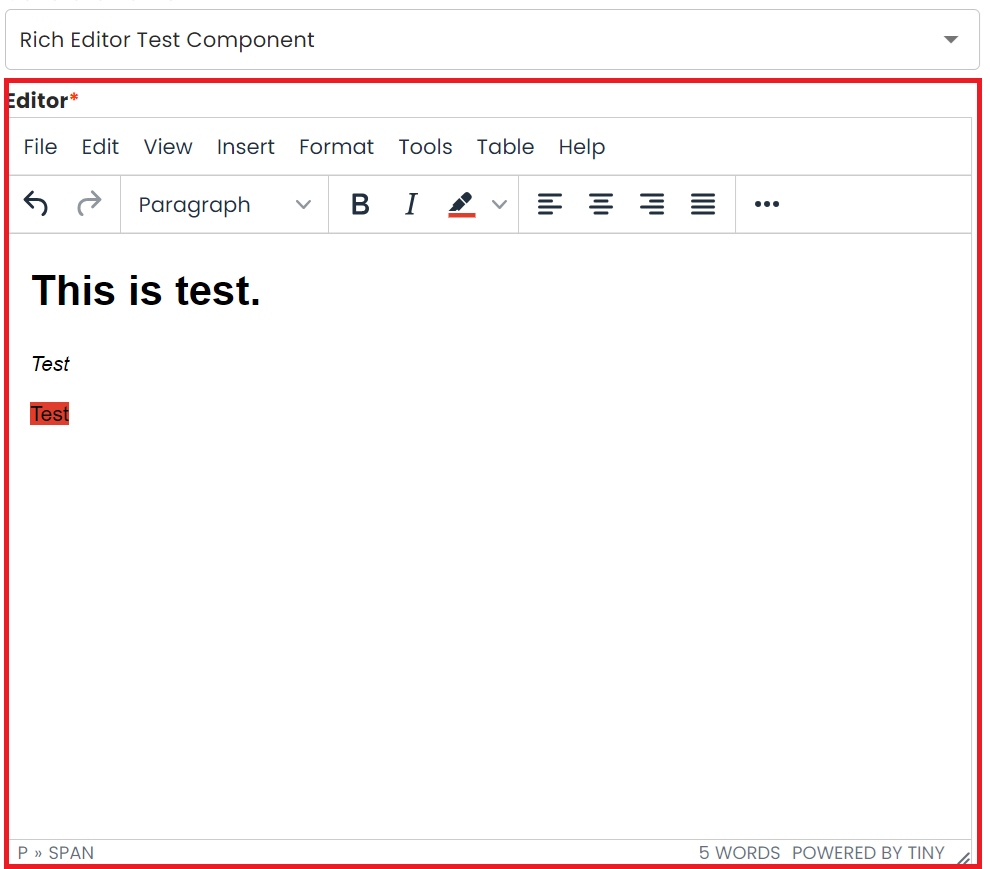
RICH_EDITOR- component that allows you to use rich text in the plugins.
We have a few factory methods to easily create the components:
public static final GuiParameter getTextField(String label, String identifier, String value);
public static final GuiParameter getPositiveNumberTextField(String label, String identifier, String value);
public static final GuiParameter getTextArea(String label, String identifier, String value, int lines);
public static final GuiParameter getComboBox(String label, String identifier, String value, List<GuiParameterComboBoxItem> lovValues);
public static final GuiParameter getCheckBox(String label, String identifier, boolean value);
public static final GuiParameter getLabel(String label, String identifier);
public static final GuiParameter getRefreshButton(String label, String identifier);
public static final GuiParameter getLinkButton(String label, String identifier, String value);
public static final GuiParameter getMultipleComboBox(String label, String identifier, String value, List<GuiParameterComboBoxItem> lovValues);
public static final GuiParameter getDatePicker(String label, String identifier, boolean required);
public static final GuiParameter getContentTree(String label, String identifier, boolean required);
public static final GuiParameter getRichEditor(String label, String identifier);

public static final GuiParameter getHiddenField(String identifier, String value);
The UI components have additionally 3 attributes:
mandatory (methods: isMandatory, setMandatory)- the value of field cannot be null.editable (methods: isEditable, setEditable)- the field has content only to show the user (example: default prefix of the document name calculated by the method)canChangeGUI- the method can cause creation of new components. Sometimes, it is necessary to show additional UI elements or change existing elements based on the values inside the plugin e.g. different text fields should be displayed based on the value chosen inside a combo-box.
We can also set height and width of component using methods:
setHeightInCharssetWidthInChars
Additionally, all plugins used in Neowise should implement the List<GuiParameter> updateParameters(Map<String, Object> params) method.
The below example shows how to create dynamic UI in your plugins. The first step is to pass canChangeGUI parameter to your created element inside the getParameters method. In the below example checkbox element will be able to change the UI of the plugin:
@PubServerMethod(label = "parameters",
type = PluginMethod.MethodType.GENERIC,
description = "plugin method called to obtain a list of parameters needed in the UI")
public List<GuiParameter> getParameters(@PubServerMethodParameter(name = "params") final Map<String, Object> params) {
List<GuiParameter> parameters = new ArrayList<>();

boolean valueType = true;
if(params.get("exampleCheckbox") != null){
    valueType = Boolean.parseBoolean(params.get("exampleCheckbox").toString());
}
// please note the last parameter (canChangeGUI) in the getCheckBox method is set to true.
// It lets the plugin know that this UI element will make changes to the existing UI.
GuiParameter checkBox = GuiParameter.getCheckBox("Example checkbox", "exampleCheckbox", valueType,true);
parameters.add(checkBox);

return parameters;
}
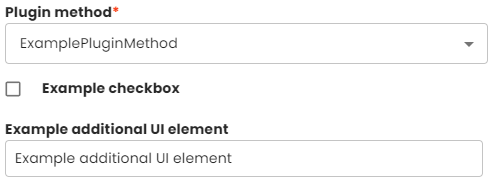
The parameter params contains the values returned in the getParameters method. The returned List<GuiParameter> contains all the elements you want to display after the UI is changed i.e. you will need to copy the existing elements if you want them to be visible after the UI is changed. The below example displays a text field only if the checkbox unchecked:
@PubServerMethod(label="parameters",
type=PluginMethod.MethodType.GENERIC,
description="plugin method called to obtain a list of parameters needed in the UI")
public List<GuiParameter> updateParameters(@PubServerMethodParameter(name="params") final Map<String,Object> params) {
List<GuiParameter> parameters = getParameters(params);

boolean valueType = true;
if(params.get("exampleCheckbox") != null){
    valueType = Boolean.parseBoolean(params.get("exampleCheckbox").toString());
}

if (!valueType) {
    parameters.add(GuiParameter.getTextField("Example additional UI element", "exampleAdditionalUIElement", ""));
    return parameters;
}

return parameters;
}
Resulting initial UI:

After changing the value of the checkbox:
3. Review of Method Types – Use Cases
3.1 SEARCH_CONTENT
Methods of this type, like p. 1.1, are used to search buckets for content tree in Neowise
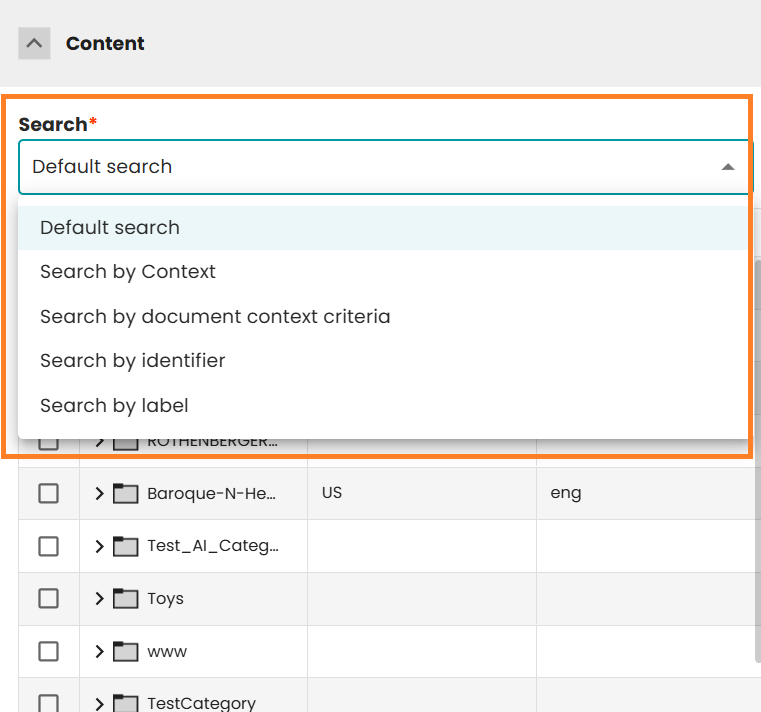 In standard delivery we have:
-
Default search
The default search engine allows you to find content quickly. It searches all content without any restrictions.
-
Search by context
This method allows you to search for content within a specific context, such as a lanuage and country.
-
Search by document context criteria
Allows you to search content using context values derived from the document. These criteria are configurable in ISON and enable dynamic searching content based on document-specific information.
Supported Criteria Types:
-
Document Variable (useDocumentVariable)
Uses the value of a specified document variable (defined by the defaultValue of the parameter name) to filter content.
-
Layer-Based Context (useLayerName)
Derives context values from the document’s layer name using a defined pattern (parameter format). For example, a pattern like #country#language#text allows extracting values such as country and language from the layer name.
-
Static Value (staticValue)
Uses a fixed value (defined by the defaultValue of the parameter value) as the context for filtering.
-
-
Search by identifier
Use this method to retrieve specific content by its unique identifier. Optionally, the user can specify an entity.
-
Search by label
This method allows you to search for content by its label. Optionally, the user can specify an entity. Additionally, the user can specify whether content should be searched only at the root level.
3.2 DOCUMENT_NAMES
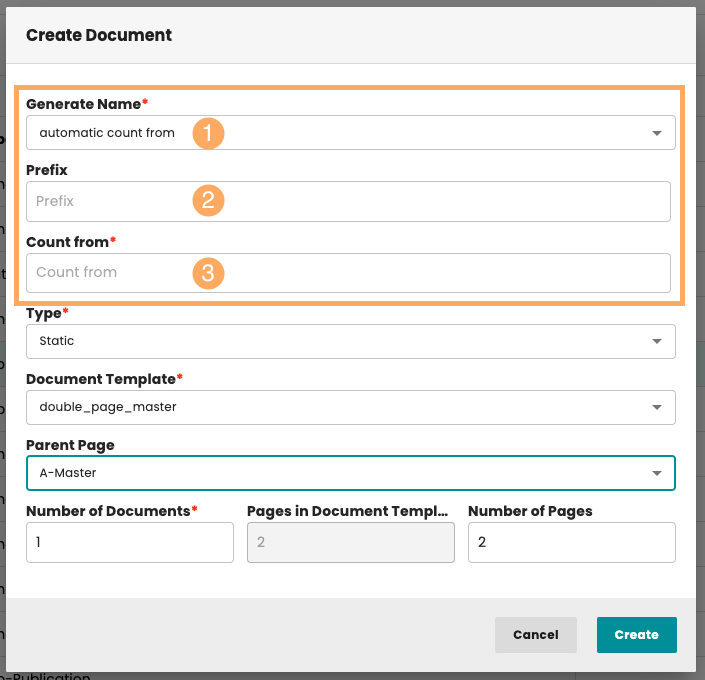
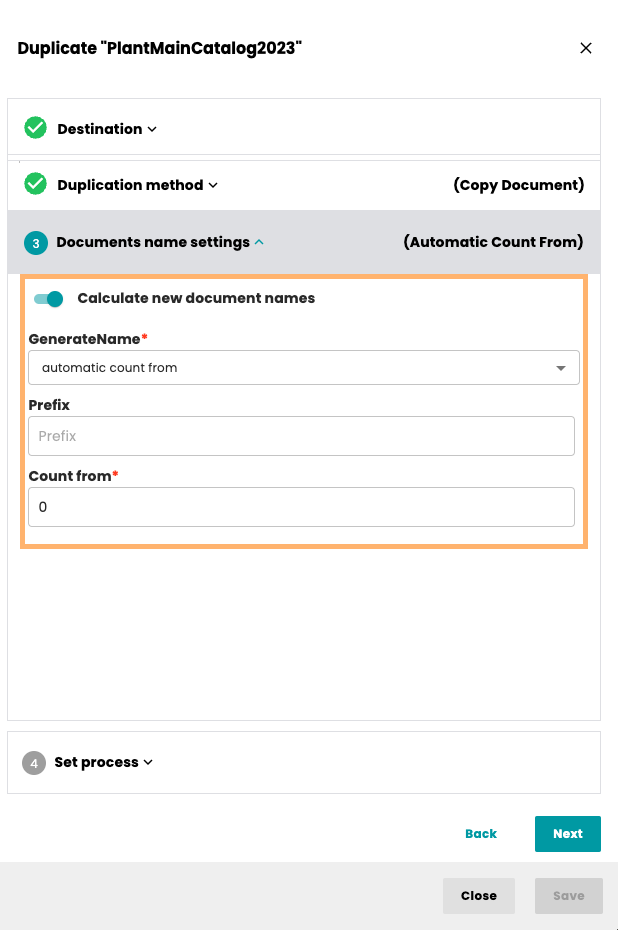
Methods of this type are used to generate new document names during the creation of new Documents.
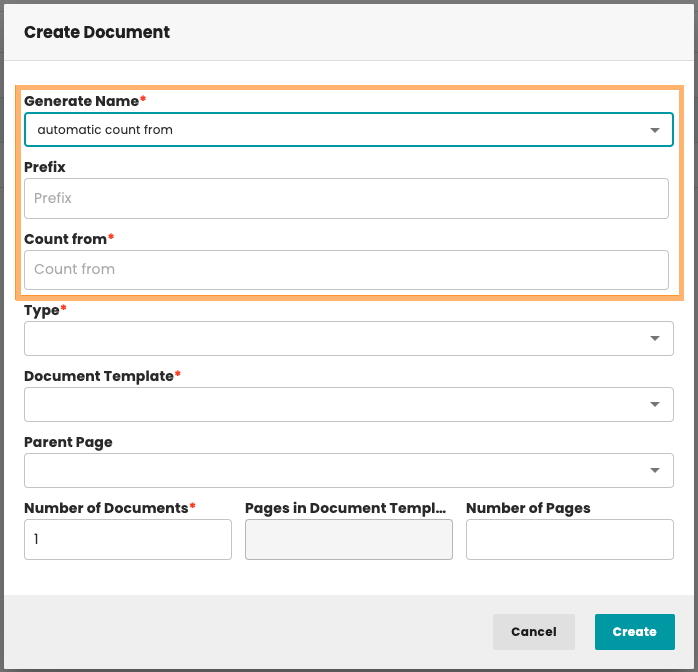
They can also be used while duplicating a Document or Publication:
3.3 DOCUMENT_CLONE
This kind of method is used during duplication of the Document. The method implements the way of creating new Document based on the source.
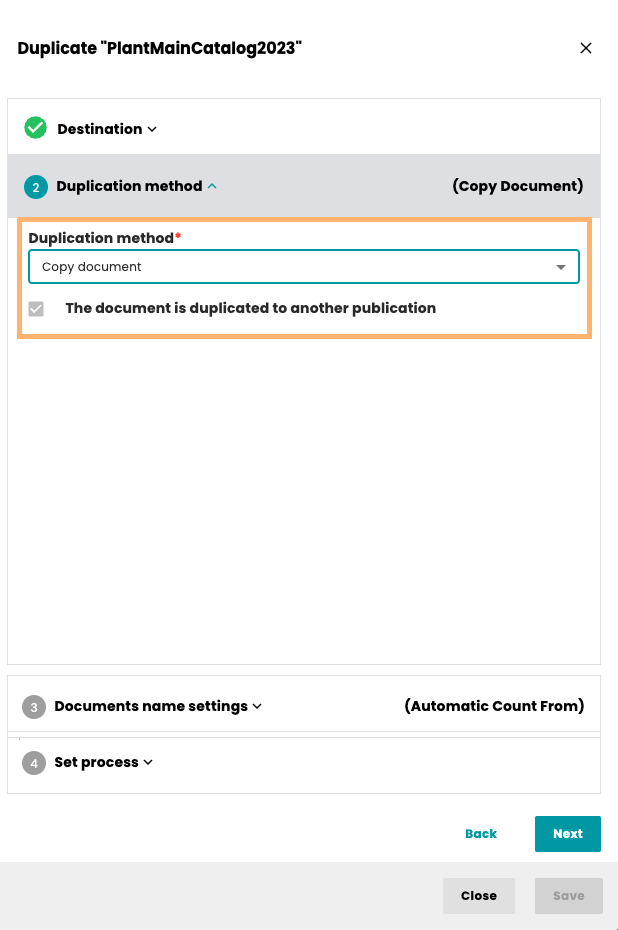
3.3.1 Copy document
Standard duplication document method.
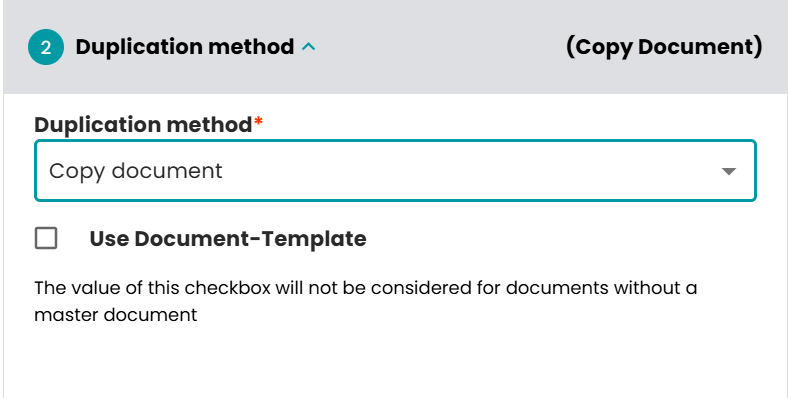
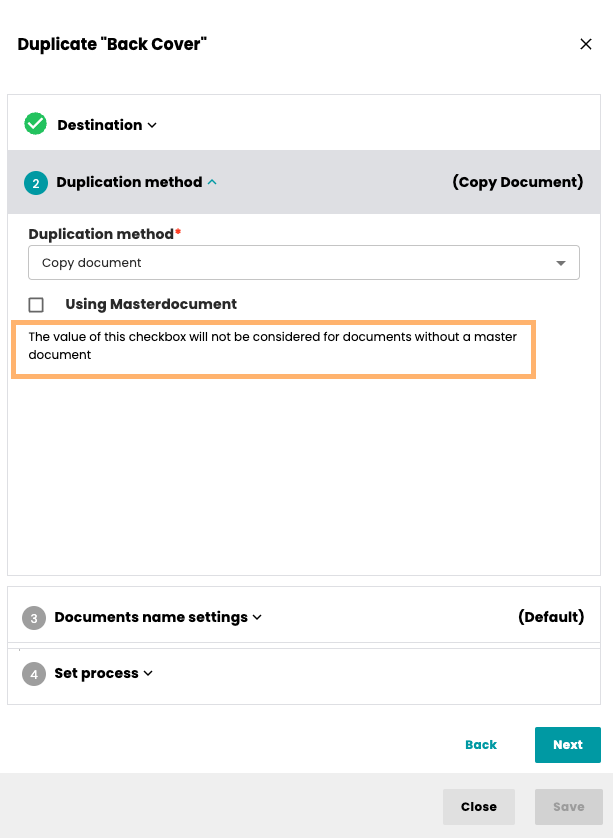
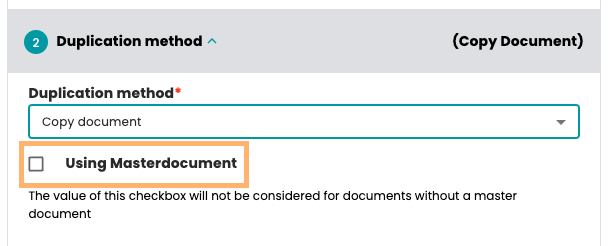
- Using masterDocument - Checked: The planning-records will be duplicated, but the document itself is empty (it duplicates the template document not the rendered document) unchecked: the rendered document with all rendered products is copied.
3.3.1 Page adoption
This can be used if the creation of snippets is activated. If the rendered products of the document are stored as snippets, in the duplicated plannings the product templates are replaced by the snippets.
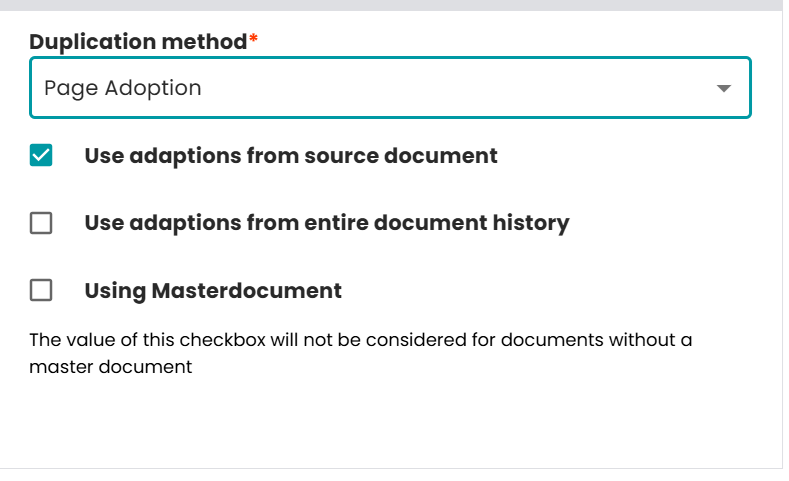
- Use adoptions from source document - Checked: Adaptions from the source document are applied. Existing snippets from the source document are considered during processing. Unchecked: Snippets from the source document are ignored.
- Use adoptions from entire document history - Checked: Snippets from parent or historical document versions are included. Unchecked: Only snippets from the current source document are used.
- Using masterDocument - Checked: The planning-records will be duplicated, but the document itself is empty (it duplicates the template document not the rendered document) unchecked: the rendered document with all rendered products is copied.
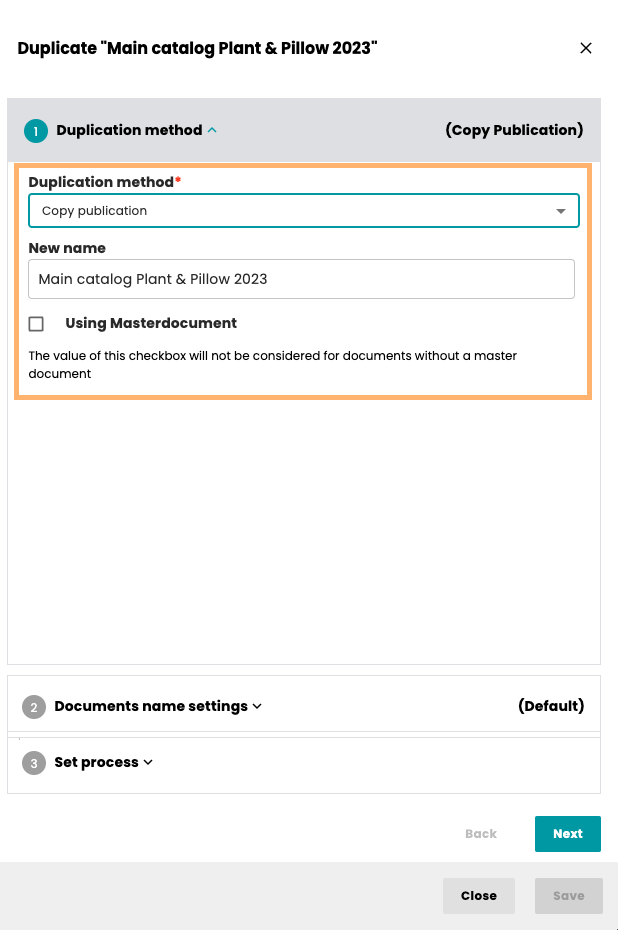
3.4 PUBLICATION_CLONE
This kind of method is used during duplication of the Publication.
3.5 DASHLET
The methods of this type are used to generate the data for the Dashlets that are shown inside the Dashboard window of Neowise.
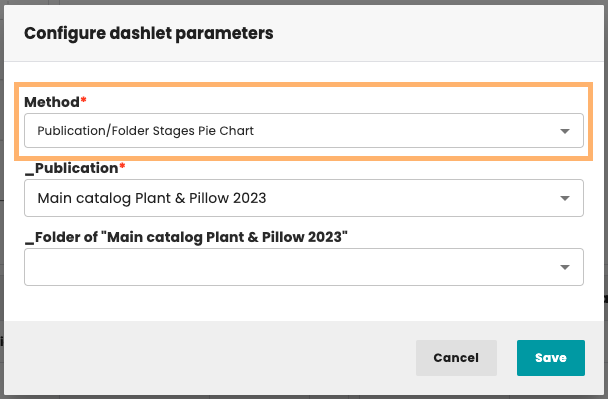
The getParameters and updateParameters methods must be defined as it is now possible to configure the parameters for the Dashlets from the UI. Additionally, the getParameters method and the method used to get the data must use the following method from the com.priint.pubserver.dashboard.interfaces.DashletServiceLocal:
List<ChartParam> mergedParameters = dashletServiceLocal.getParametersByUserProjectDashlet(sessionInfo.getLogin(), sessionInfo.getDataSetLabel(),chartId);
3.6 AFTER_PLANNING_CREATION
Methods of this type are executed automatically after one or more plannings have been created in Neowise.
The plugin must define the getParameters() and updateParameters() methods. For this action type, both methods should return an empty list.
Configuration
For an AFTER_PLANNING_CREATION action to be executed, the target document must contain the following document metadata (parameters):
| Identifier | Label | Type | Description |
|---|---|---|---|
runActionAfterPlanningCreation | Should run action after planning creation | Checkbox | Enables execution of the action after planning creation. The action is executed only when this parameter is enabled. |
actionAfterPlanningCreationJNDI | Method for execution after Planning creation | Dropdown | Specifies the JNDI name of the plugin method that should be executed. |
The definitions of these parameters are provided by the system and are already available in the database. They do not need to be created manually.
After implementing and deploying a new AFTER_PLANNING_CREATION plugin, its JNDI name must be added to the afterPlanningCreationActionList configuration in the AdminUI module (menu: Publication->Value-list). Otherwise, the method will not be available for selection in the Method for execution after Planning creation dropdown.
Input Parameters
The execution method receives a map containing the following predefined parameters:
| Parameter | Description |
|---|---|
DOCUMENT_ID | Identifier of the document in which the plannings were created. |
TENANT | Current tenant identifier. |
PROJECT | Current project identifier. |
ENTITY_MODEL_IDENTIFIER | Identifier of the entity model. |
LOGIN | Login of the user who created the plannings. |
CONTEXT | Current execution context (Context). |
NEW_PLANNING_IDS | List of identifiers of the newly created plannings (List<String>). |
The action is executed once per planning creation operation, regardless of the number of plannings created. Identifiers of all newly created plannings are available through the NEW_PLANNING_IDS parameter.
4. Sample Implementations
4.1 SEARCH_CONTENT - Bucket search by label
This plugin will help users find the right bucket by providing the label. Additionally, it will allow to choose the entity (combobox) and will provide the possibility to search only the first level of buckets (checkbox ). 
The method building UI – getParameters() – looks as follows:
@PubServerMethod(label="parameters",
         type=PluginMethod.MethodType.GENERIC,
         description="plugin method called to obtain a list of parameters needed in gui")
public List<GuiParameter> getParameters(@PubServerMethodParameter(name="params") final Map<String,Object> params) {

   List<GuiParameter> result = new ArrayList<GuiParameter>();
   GuiParameter entityLabel = GuiParameter.getTextField("LABEL", ENTITY_LABEL, params.containsKey(ENTITY_LABEL)?(String)params.get(ENTITY_LABEL):"");
   entityLabel.getTranslations().put(PubPlannerPlugins.DE, "Bezeichnung");
   entityLabel.getTranslations().put(PubPlannerPlugins.EN, "Label");
   result.add(entityLabel);

   List<GuiParameterComboBoxItem> lovValues = new ArrayList<GuiParameterComboBoxItem>();
   GuiParameterComboBoxItem emptyComboItem = new GuiParameterComboBoxItem("- No selection -", "-1");
   lovValues.add(emptyComboItem);
   String entityModelIdentifier = (String)params.get(ENTITY_MODEL_IDENTIFIER);
   EntityModel entityModel = Utils.getEntityModel(entityModelIdentifier);
   boolean onlyRoots =  params.containsKey(ONLY_ROOTS) && Boolean.parseBoolean((String)params.get(ONLY_ROOTS));
   Map<String, String> entities = Utils.getEntityBucketNames(entityModel, onlyRoots);
   Map<String, String> sortedEntities = entities.entrySet().stream()
         .sorted(Map.Entry.<String, String>comparingByValue())
         .collect(Collectors.toMap(Map.Entry::getKey, Map.Entry::getValue, (e1, e2) -> e1, LinkedHashMap::new));
   sortedEntities.forEach((key, value)->{
      GuiParameterComboBoxItem comboItem = new GuiParameterComboBoxItem(value, key);
      lovValues.add(comboItem);
   });

   List <GuiParameter>hBoxChildren = new ArrayList();
      GuiParameter entitiesCombo = GuiParameter.getComboBox("Entity", ENTITY_IDENTIFIER, null, lovValues);
   if (params.containsKey(ENTITY_IDENTIFIER) && params.get(ENTITY_IDENTIFIER)!= null && !(params.get(ENTITY_IDENTIFIER).toString()).isEmpty()) {
         entitiesCombo.setValue(params.get(ENTITY_IDENTIFIER).toString());
      }else{
      entitiesCombo.setValue("-1");
   }
   entitiesCombo.setHeightInChars(1);
   entitiesCombo.setWidthInChars(55);
      entitiesCombo.getTranslations().put(PubPlannerPlugins.EN, "Entity");
      entitiesCombo.getTranslations().put(PubPlannerPlugins.DE, "Entität");
   hBoxChildren.add(entitiesCombo);

   GuiParameter onlyRootsCB =  GuiParameter.getCheckBox("search only first level", ONLY_ROOTS, onlyRoots);
   onlyRootsCB.setCanChangeGUI(true);
   onlyRootsCB.getTranslations().put(PubPlannerPlugins.DE, "nur oberste Ebene durchsuchen");
   onlyRootsCB.getTranslations().put(PubPlannerPlugins.EN, "search only first level");
   onlyRootsCB.setHeightInChars(1);
   hBoxChildren.add(onlyRootsCB);

   GuiParameter hBox = GuiParameter.getHorizontalPanel("hbox", hBoxChildren);
   hBox.setWidthInChars(60);
   result.add(hBox);

   return result;
}
The main method, annotated with type as SEARCH_CONTENT, uses EntityManager to search bucket by label. It also uses available parameters from UI, located in map of parameters:
PubPlannerPlugins.ParameterNames.SESSIONID
@SuppressWarnings("unchecked")
@PubServerMethod(label="SearchBucketByLabel",
             type=PluginMethod.MethodType.SEARCH_CONTENT,
      description="plugin method called to search buckets")
public List<Bucket> searchBuckets(@PubServerMethodParameter(name="parameters") final Map<String,Object> parameters) throws ServerException {
   List<Bucket> result = new ArrayList<>();
   String sessionId = (String)parameters.get(PubPlannerPlugins.ParameterNames.SESSIONID.toString());
   String entityModelIdentifier = (String)parameters.get(ENTITY_MODEL_IDENTIFIER);
   String entityIdentifier = parameters.containsKey(ENTITY_IDENTIFIER) && parameters.get(ENTITY_IDENTIFIER)!= null && !parameters.get(ENTITY_IDENTIFIER).equals("-1")? parameters.get(ENTITY_IDENTIFIER).toString():"";
   String entityLabel = parameters.containsKey(ENTITY_LABEL)?(String)parameters.get(ENTITY_LABEL):"";
   try{
      boolean onlyRoots =  parameters.containsKey(ONLY_ROOTS) && Boolean.parseBoolean((String)parameters.get(ONLY_ROOTS));
      List<EntityBucket> bucketEntities = Utils.getBucketsEntitiesList(entityModelIdentifier, onlyRoots);
      if(bucketEntities != null && !bucketEntities.isEmpty()) {
         for (EntityBucket entityBucket:bucketEntities) {
            if(entityIdentifier.isEmpty() || entityBucket.getIdentifier().equals(entityIdentifier)){
               List<Bucket> subRes = serviceLocator.getEntityManager(sessionId).getBuckets(sessionId, entityModelIdentifier, entityBucket.getIdentifier(), entityLabel);
               result.addAll(subRes.stream().filter((bucket -> {
                  return ((onlyRoots && (bucket.getParentBucketId() == null || bucket.getParentBucketId().equals(""))) || !onlyRoots) ;
               })).collect(toList()));
            }
         }
      }
   }catch (EntityManagerException e){
      throw new ServerException(1, SearchByLabel.this, e.getLocalizedMessage());
   }
   return  result;
}
4.2 DOCUMENT_NAMES
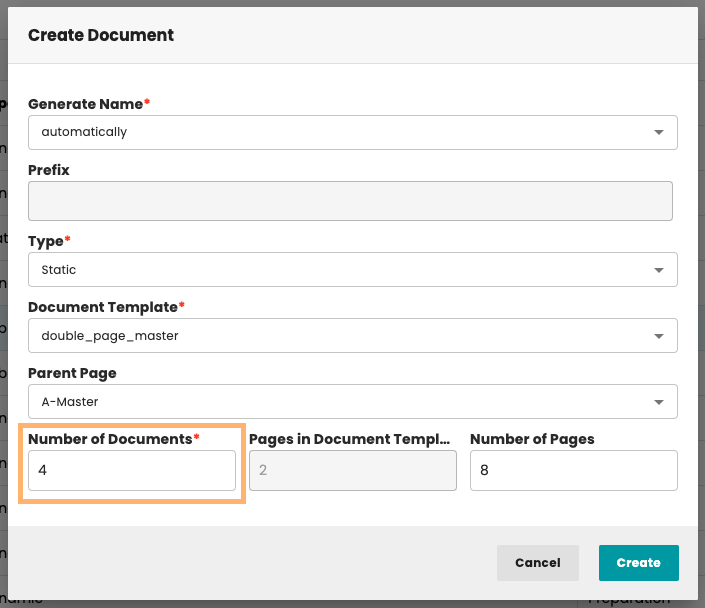
In this case, we want to provide mechanism to generate document names for larger amount of documents. Let’s assume we want to let the user enter the start value. The getParameters() method can be like this:
public List<GuiParameter> getParameters(
                   @PubServerMethodParameter(name = "params") final Map<String, Object> params) {
           List<GuiParameter> result = new ArrayList<GuiParameter>();
           GuiParameter countFrom = GuiParameter.getTextField("Count from", "countFromID", "");
           countFrom.getTranslations().put(PubPlannerPlugins.DE, "Zähler ab");
           countFrom.getTranslations().put(PubPlannerPlugins.EN, "Count from");
           countFrom.setMandatory(true);
           result.add(countFrom);
           return result;
}
The main method can be as follows:
  @PubServerMethod(label="automatic count from",
                   type=PluginMethod.MethodType.DOCUMENT_NAMES,
                   description="plugin method called to obtain a list document names")
public List<String> getDocumentNames(@PubServerMethodParameter(name="parameters") final Map<String,Object> parameters) throws ServerException {
          List<String> result = new ArrayList<String>();
          String howMany = (String)parameters.get(PubPlannerPlugins.ParameterNames.COUNT.toString());
          String countFrom = (String)parameters.get("countFromId");

          int docCount = Integer.parseInt(howMany);
          int iCountFrom = Integer.parseInt(countFrom);
          int iCountTo = docCount+iCountFrom;
          for (int i = iCountFrom; i < iCountTo; i++) {
                  String docName = String.format("%04d", i);
                  result.add(docName);
          }
          return result;
}
Note: PubPlannerPlugins.ParameterNames.COUNT is a key of the object (in the map params) containing number of documents to create.
4.3 DOCUMENT_CLONE
We want to provide a mechanism of cloning(duplicating) documents. We need to create a plugin with proper method. In this case the default implementation will be described.
The PlannerEngineServiceLocator provides access to the various service interfaces. For instance, to work with documents:
DocumentServiceLocal documentServiceLocal = PlannerEngineServiceLocator.INSTANCE.getDocumentServiceLocal();
The UI dialog contains only one component – it is a checkbox to select if we want to duplicate document using masterdocument (document template):
The method building dialog – getParameters() – looks as follows:
//identifier of GUI component using as key in map of parameters
private static final String USE_MASTERDOCUMENT= "USE_MASTERDOCUMENT";

@PubServerMethod(label = "parameters", type = PluginMethod.MethodType.GENERIC, description = "plugin method called to obtain a list of parameters needed in gui")
  public List<GuiParameter> getParameters(
                  @PubServerMethodParameter(name = "params") final Map<String, Object> params) {

          List<GuiParameter> result = new ArrayList<GuiParameter>();

          GuiParameter useMasterDocument = GuiParameter.getCheckBox("Using Masterdocument", USE_MASTERDOCUMENT, false);
          useMasterDocument.getTranslations().put(PubPlannerPlugins.DE, "Musterdokumente verwenden");
          useMasterDocument.getTranslations().put(PubPlannerPlugins.EN, "Using Masterdocument");
          useMasterDocument.setMandatory(true);
          try {
                  InDesignServerSettings settings = serviceLocator.getInDesignServerSettings();
                  if (null != settings) {
                          useMasterDocument.setValue(settings.isUseMasterDocument() + "");
                  }
          } catch (Exception e) {
                  e.printStackTrace();
          }
          result.add(useMasterDocument);
          return result;
  }
The main method, annotated with type as DOCUMENT_CLONE. It also uses available parameters from main dialog, located in map of parameters:
PubPlannerPlugins.ParameterNames.SESSIONIDPubPlannerPlugins.ParameterNames.SOURCEDOCUEMNTSPubPlannerPlugins.ParameterNames.NAMESOFDOCUMENTSPubPlannerPlugins.ParameterNames.TARGETPUBLICATIONS
@PubServerMethod(label="StandardDocumentClone",
                                   type=PluginMethod.MethodType.DOCUMENT_CLONE,
                           description="plugin method called to clone documents")
public Boolean cloneDocuments(@PubServerMethodParameter(name="parameters") final Map<String,Object> parameters) throws ServerException {

  Boolean result = Boolean.TRUE;

  String sessionId = (String)parameters.get(PubPlannerPlugins.ParameterNames.SESSIONID.toString());

  List<String>sourceDocuments = (List<String>)parameters.get(PubPlannerPlugins.ParameterNames.SOURCEDOCUEMNTS.toString());

  List<String>newDocumentNames = (List<String>)parameters.get(PubPlannerPlugins.ParameterNames.NAMESOFDOCUMENTS.toString());

  List<String>targetPublications = (List<String>)parameters.get(PubPlannerPlugins.ParameterNames.TARGETPUBLICATIONS.toString());

  String tryToUseDocumentTemplate = (String)parameters.get(USE_MASTERDOCUMENT);

  if (targetPublications != null && !targetPublications.isEmpty()){
          for (String publicationID:targetPublications){
                  if (sourceDocuments != null && !sourceDocuments.isEmpty()){
                          int index = 0;
                          for (String documentID:sourceDocuments){
                                  String newName = "";
                                  if (newDocumentNames != null && !newDocumentNames.isEmpty()){
                                          newName = (String)newDocumentNames.get(0);
                                          if (index <newDocumentNames.size()){
                                                  newName = (String)newDocumentNames.get(index);
                                                  }
                                  }
                                  index++;
                              documentServiceLocal.
                                      duplicateDocument(sessionId,
                                    documentID, publicationID, newName, tryToUseDocumentTemplate);
                          }
                  }
          }
  }
return result;
}
4.4 PUBLICATION_CLONE
It is similar to DOCUMENT_CLONE. In this example, the UI dialog stays the same, the user can decide whether the Document Template should be used. It also uses PlannerEngineServiceLocator to access some EJB.
PublicationServiceLocal publicationServiceLocal = PlannerEngineServiceLocator.INSTANCE.getPublicationServiceLocal();
@PubServerMethod(label="clonePublications",
                                   type=PluginMethod.MethodType.PUBLICATION_CLONE,
                           description="plugin method called to clone documents")
public Boolean clonePublications(@PubServerMethodParameter(name="parameters") final Map<String,Object> parameters) throws ServerException {
          Boolean result = Boolean.TRUE;

  String sessionId = (String)parameters.get(PubPlannerPlugins.ParameterNames.SESSIONID.toString());

  List<String>sourcePublications = (List<String>)parameters.get(PubPlannerPlugins.ParameterNames.SOURCEDOCUEMNTS.toString());

  List<String>targetPublications = (List<String>)parameters.get(PubPlannerPlugins.ParameterNames.TARGETPUBLICATIONS.toString());

  String tryToUseDocumentTemplate = (String)parameters.get(USE_MASTERDOCUMENT);

  String newPublicationName="";
  if (targetPublications != null && !targetPublications.isEmpty()){
          for (String publicationID:targetPublications){
                  if (sourcePublications != null && !sourcePublications.isEmpty()){
                          for (String pubID:sourcePublications){
                                  PucPublication[] pucPublications = serviceLocator.getCometDataLocal().
                                   getPucPublications(sessionId, pubID,"","","","");
                                  if (pucPublications!=null && pucPublications.length>0 ) {
                                          newPublicationName = pucPublications[0].getLabel()!=null ?
                                          "dup "+pucPublications[0].getLabel() : "";
                                  } else {
                                          newPublicationName = "";
                                  }
                              publicationServiceLocal.
                                          publicationServiceLocal(sessionId,
                            pubID, publicationID, newPublicationName, tryToUseDocumentTemplate);
                           }
                  }
          }
  }
  return result;
  }
4.5. AFTER_PLANNING_CREATION - create additional metadata for created planning
The following example demonstrates how to implement an AFTER_PLANNING_CREATION plugin.
The plugin is executed once after a planning creation operation. It iterates through all planning identifiers received in the NEW_PLANNING_IDS parameter and, for each planning, creates a new metadata entry:
| Property | Value |
|---|---|
| Key | afterPlanningCreation |
| Value | contentMetaDataValueFromPluginAfterCreation |
This example can be used as a starting point for custom post-processing logic, such as:
- creating additional metadata,
- initializing planning-specific settings,
- assigning default values,
- triggering integration with external systems,
- logging or auditing newly created plannings.
Example implementation:
@Stateless(mappedName = "AfterAddPlanningAction1")
@LocalBean
@PubServerPlugin(description="After planning creation action plugin")
public class AfterAddPlanningAction1 extends PluginControlDefault {

    private final PlannerEngineServiceLocator plannerEngineServiceLocator = PlannerEngineServiceLocator.INSTANCE;
    private static final Map<String,String> nameTranslations = new HashMap<String,String>();

    static {
        nameTranslations.put(PubPlannerPlugins.DE, "After planning creation action");
        nameTranslations.put(PubPlannerPlugins.EN, "After planning creation action DE");
    }

    @PubServerMethod(label="parameters",
            type=PluginMethod.MethodType.GENERIC,
            description="plugin method called to obtain a list of parameters needed in gui")
    public List<GuiParameter> getParameters(@PubServerMethodParameter(name="params") final Map<String,Object> params) {

        return new ArrayList<GuiParameter>();

    }

    @Lock(LockType.READ)
    @PubServerMethod(label="parameters",
            type=PluginMethod.MethodType.GENERIC,
            description="plugin method called to obtain a list of parameters needed in gui")
    public List<GuiParameter> updateParameters(@PubServerMethodParameter(name="params") final Map<String,Object> params) {
        return getParameters(params);
    }

    @PubServerMethod(label="name",
            type=PluginMethod.MethodType.GENERIC,
            description="plugin method called to obtain a translation of plugin label")
    public String getMethodName(@PubServerMethodParameter(name="lang", defaultValue=PubPlannerPlugins.EN, listOfValues={}) final String lang) {
        if (nameTranslations.containsKey(lang)) {
            return nameTranslations.get(lang);
        } else {
            return nameTranslations.get(PubPlannerPlugins.EN);
        }
    }

    @SuppressWarnings("unchecked")
    @PubServerMethod(label="AfterPlanningCreationMethod2",
            type=PluginMethod.MethodType.AFTER_PLANNING_CREATION,
            description="plugin method called after planning creation")
    public Boolean afterPlanningCreation(@PubServerMethodParameter(name="parameters") final Map<String,Object> parameters) throws ServerException {
        Boolean result = Boolean.TRUE;

        List<String>addedPlanningIds = (List<String>)parameters.get("NEW_PLANNING_IDS");
        String documentId = parameters.get("DOCUMENT_ID").toString();
        String tenant = parameters.get("TENANT").toString();
        String project = parameters.get("PROJECT").toString();
        String entityModelIdentifier = parameters.get("ENTITY_MODEL_IDENTIFIER").toString();
        String login = parameters.get("LOGIN").toString();
        Context context = parameters.containsKey("CONTEXT")?(Context)parameters.get("CONTEXT"):new Context();

        if (addedPlanningIds != null && !addedPlanningIds.isEmpty()) {
            addedPlanningIds.forEach(planningId->{
                List<Planning> plannings = getEntityManager().getPlanningByIdentifier(getSessionId(), planningId, "");
                if(plannings!=null && !plannings.isEmpty()){
                    Optional<Planning> planningOptional = plannings.stream().filter(planning->{
                        if (planning.getContext()!=null) {
                            return planning.getContext().equals(context);
                        }
                        return true;
                    }).findFirst();
                    if(planningOptional.isPresent()){
                        try {
                            List<ContentMetaData> contentMetaDataList = getEntityManager().getEntityMetadataOfPlanning(getSessionId(), entityModelIdentifier, planningOptional.get().getEntityIdentifier(), planningId, "", context, "");
                            if (contentMetaDataList != null && !contentMetaDataList.isEmpty()) {
                                ContentMetaData parentContentMetaData = contentMetaDataList.get(0);
                                ContentMetaData contentMetaData = new ContentMetaData();
                                contentMetaData.setEntityContentMetaDataId(parentContentMetaData.getEntityContentMetaDataId());
                                contentMetaData.setIdentifier(UUID.randomUUID().toString());
                                contentMetaData.setCreatedOn(new Date());
                                contentMetaData.setCreatedBy(login);
                                contentMetaData.setKey("afterPlanningCreation");
                                contentMetaData.setValue("contentMetaDataValueFromPluginAfterCreation");
                                contentMetaData.setSequence(contentMetaDataList.size());
                                List<ContentMetaData> listOfDataToSave;
                                EntityDataReference parentRef = new EntityDataReference();
                                listOfDataToSave = Collections.singletonList(contentMetaData);
                                parentRef.setIdentifier(planningId);
                                parentRef.setEntityModelId(entityModelIdentifier);
                                parentRef.setEntityId("PLANNING");
                                parentRef.setEntityClassName(Entity.DataClass.PLANNING);
                                contentMetaData.setParentRef(parentRef);
                                getEntityManager().setEntityContentMetaData(getSessionId(), entityModelIdentifier, "", listOfDataToSave);

                            }
                        } catch (EntityManagerException e) {
                            throw new RuntimeException(e);
                        }
                    }
                }

            });

        }

        return result;
    }


    private EntityManagerLocal getEntityManager() {
        return PluginUtils.getPlugin(Constants.MANAGER_ENTITY, PluginControlDefault.getSessionId(), EntityManagerLocal.class);
    }

}
Execution flow:
- Read the list of newly created planning identifiers from
NEW_PLANNING_IDS. - Load each planning.
- Retrieve existing planning metadata.
- Create a new metadata entry.
- Associate the metadata with the planning.
- Persist the metadata using
setEntityContentMetaData(...).
4.6. AFTER_PLANNING_CREATION - automatically create subPlanning
The following example demonstrates how an AFTER_PLANNING_CREATION plugin can automatically extend the planning structure after creation.
For each planning identifier received in NEW_PLANNING_IDS, the plugin:
- Loads the newly created planning.
- Retrieves child buckets of the planning's bucket.
- Checks whether the bucket contains any subbuckets.
- Creates a new subplanning based on the first available subbucket.
- Associates the created subplanning with the parent planning.
- Updates the parent planning structure.
As a result, whenever a planning is created from a bucket that contains subbuckets, an additional subplanning is automatically generated and attached to the newly created planning.
This mechanism can be used to automatically build hierarchical planning structures without requiring manual user interaction.
Typical use cases include:
- automatic creation of detail plannings,
- initialization of predefined planning hierarchies,
- creation of planning trees based on bucket structures,
- automatic expansion of product or category content.
Example implementation:
@Stateless(mappedName = "AfterAddPlanningAction2")
@LocalBean
@PubServerPlugin(description = "After planning creation action plugin")
public class AfterAddPlanningAction2 extends PluginControlDefault {

    private static final Map<String, String> nameTranslations = new HashMap<>();

    static {
        nameTranslations.put(PubPlannerPlugins.DE, "After planning creation action");
        nameTranslations.put(PubPlannerPlugins.EN, "After planning creation action DE");
    }

    @PubServerMethod(
            label = "parameters",
            type = PluginMethod.MethodType.GENERIC,
            description = "plugin method called to obtain a list of parameters needed in gui"
    )
    public List<GuiParameter> getParameters(
            @PubServerMethodParameter(name = "params") final Map<String, Object> params) {
        return new ArrayList<>();
    }

    @Lock(LockType.READ)
    @PubServerMethod(
            label = "parameters",
            type = PluginMethod.MethodType.GENERIC,
            description = "plugin method called to obtain a list of parameters needed in gui"
    )
    public List<GuiParameter> updateParameters(
            @PubServerMethodParameter(name = "params") final Map<String, Object> params) {
        return getParameters(params);
    }

    @PubServerMethod(
            label = "name",
            type = PluginMethod.MethodType.GENERIC,
            description = "plugin method called to obtain a translation of plugin label"
    )
    public String getMethodName(
            @PubServerMethodParameter(
                    name = "lang",
                    defaultValue = PubPlannerPlugins.EN,
                    listOfValues = {}
            ) final String lang) {
        return nameTranslations.getOrDefault(lang, nameTranslations.get(PubPlannerPlugins.EN));
    }

    @SuppressWarnings("unchecked")
    @PubServerMethod(
            label = "AfterPlanningCreationMethod2",
            type = PluginMethod.MethodType.AFTER_PLANNING_CREATION,
            description = "plugin method called after planning creation"
    )
    public Boolean afterPlanningCreation(
            @PubServerMethodParameter(name = "parameters") final Map<String, Object> parameters
    ) throws ServerException {

        List<String> addedPlanningIds = (List<String>) parameters.get("NEW_PLANNING_IDS");

        if (addedPlanningIds == null || addedPlanningIds.isEmpty()) {
            return Boolean.TRUE;
        }

        String documentId = parameters.get("DOCUMENT_ID").toString();
        String entityModelIdentifier = parameters.get("ENTITY_MODEL_IDENTIFIER").toString();
        String login = parameters.get("LOGIN").toString();
        Context context = parameters.containsKey("CONTEXT")
                ? (Context) parameters.get("CONTEXT")
                : new Context();

        List<Planning> parentsToSave = new ArrayList<>();

        for (String planningId : addedPlanningIds) {
            List<Planning> plannings = getEntityManager()
                    .getPlanningByIdentifier(getSessionId(), planningId, "");

            if (plannings == null || plannings.isEmpty()) {
                continue;
            }


                Optional<Planning> planningOptional = plannings.stream().filter(planning->{
                    if (planning.getContext()!=null) {
                        return planning.getContext().equals(context);
                    }
                    return true;
                }).findFirst();

            if (!planningOptional.isPresent()) {
                continue;
            }

            Planning parent = planningOptional.get();

            try {
                List<Bucket> subContentBuckets = getEntityManager().getEntityChildBuckets(
                        getSessionId(),
                        entityModelIdentifier,
                        parent.getEntityBucketId(),
                        parent.getBucketId(),
                        "",
                        context,
                        ""
                );

                if (subContentBuckets == null || subContentBuckets.isEmpty()) {
                    continue;
                }

                Bucket bucket = subContentBuckets.get(0);

                Planning subPlanning = createSubPlanning(
                        bucket,
                        parent,
                        documentId,
                        entityModelIdentifier,
                        login,
                        context
                );

                getEntityManager().setPlanning(
                        getSessionId(),
                        entityModelIdentifier,
                        "",
                        Collections.singletonList(subPlanning)
                );

                BucketPlanningReference reference = createBucketPlanningReference(
                        bucket,
                        parent,
                        subPlanning,
                        login
                );

                if (parent.getListPlanning() == null) {
                    parent.setListPlanning(new ArrayList<>());
                }

                if (parent.getBucketList() == null) {
                    parent.setBucketList(new ArrayList<>());
                }

                parent.getListPlanning().add(subPlanning);
                parent.getBucketList().add(reference);

                parentsToSave.add(parent);

            } catch (EntityManagerException e) {
                throw new RuntimeException(e);
            }
        }

        if (!parentsToSave.isEmpty()) {
            try {
                getEntityManager().updatePlanning(
                        getSessionId(),
                        entityModelIdentifier,
                        parentsToSave
                );
            } catch (EntityManagerException e) {
                throw new RuntimeException(e);
            }
        }

        return Boolean.TRUE;
    }

    private Planning createSubPlanning(
            Bucket bucket,
            Planning parent,
            String documentId,
            String entityModelIdentifier,
            String login,
            Context context
    ) {
        boolean isInt = bucket.getTemplate() != null && bucket.getTemplate().matches("-?\\d+");

        Planning planning = new Planning();
        planning.setIdentifier(UUID.randomUUID().toString());
        planning.setEntityPlanningId("PLANNING");
        planning.setEntityModelId(entityModelIdentifier);
        planning.setBucketId(bucket.getIdentifier());
        planning.setEntityBucketId(bucket.getEntityIdentifier());
        planning.setLabel(bucket.getLabel());
        planning.setSequence(0);
        planning.setPrintTemplateId(isInt ? Integer.parseInt(bucket.getTemplate()) : 0);
        planning.setDocumentId(documentId);
        planning.setUpdatedBy(login);
        planning.setUpdatedOn(new Date());
        planning.setCreatedBy(login);
        planning.setCreatedOn(new Date());
        planning.setContext(context);
        planning.setPageTemplateId(bucket.getPageTemplateId());
        planning.setPageId(parent.getPageId());
        planning.setParentPlanning(parent);

        return planning;
    }

    private BucketPlanningReference createBucketPlanningReference(
            Bucket bucket,
            Planning parent,
            Planning subPlanning,
            String login
    ) {
        BucketPlanningReference reference = new BucketPlanningReference();

        reference.setPlanning(parent);
        reference.setRefPlanning(subPlanning);
        reference.setTemporary(false);
        reference.setActive(1);
        reference.setIdentifier(bucket.getIdentifier());
        reference.setEntityIdentifier(bucket.getEntityIdentifier());
        reference.setUpdatedBy(login);
        reference.setUpdatedOn(new Date());
        reference.setCreatedBy(login);
        reference.setCreatedOn(new Date());
        reference.setSequence(0);
        reference.setUniqueIdentifier(UUID.randomUUID().toString());

        return reference;
    }

    private EntityManagerLocal getEntityManager() {
        return PluginUtils.getPlugin(
                Constants.MANAGER_ENTITY,
                PluginControlDefault.getSessionId(),
                EntityManagerLocal.class
        );
    }
}